November 23, 2026
AI Appointment Setter: How It Works and Who Oversees It
Say a prospect replies at 11 p.m. asking whether you work with firms their size. You're asleep. Your sales lead has silenced notifications. By breakfast, an AI appointment setter has answered from your approved service information, asked about the project, and offered a suitable next step.
That's the attractive version. The less attractive version is waking up to a booked call with someone who wants a service you don't sell. Treat the setter like a junior hire with a rulebook, not a salesperson with unlimited authority, and you can tell the difference before your calendar does.
Table of Contents
- What an AI Setter Does and Which Tasks Stay Human
- How a Booking Moves From Reply to Calendar
- Where Human Oversight Must Step In
- Deliverability Rules That Protect Every Booking
- Measuring Whether the Setter Earns Its Place
- Confirm the Fit Before You Hand Over Your Calendar
What an AI Setter Does and Which Tasks Stay Human
An AI appointment setter handles the repetitive middle of outbound sales: reading replies, asking qualifying questions, proposing meeting times, and logging outcomes. It shouldn't decide your commercial strategy, invent an offer, or negotiate an exception because the prospect sounded persuasive.
Think of the difference between a receptionist and someone who writes excellent reception-desk dialogue. A reply generator can produce a friendly answer. A setter must also open the calendar, check the CRM record, and record what happened.
That distinction between conversation and action is central to Agency's account of tool-connected AI assistants. For an outbound operator, the useful test isn't whether the software sounds human. It's whether it completes the right workflow without stepping outside its authority.
The machinery behind the conversation
The working system needs distinct layers:
- Language model: Reads the conversation and drafts an appropriate response.
- Scheduling and CRM connections: Retrieve account information, check availability, create bookings, and save records.
- Human escalation: Sends decisions requiring judgment to a named person with the conversation attached.
For a broader comparison with sales-development work, MakeAutomation's AI sales development representatives explained offers useful context. Appointment setting is a narrower responsibility: move a suitable prospect toward a worthwhile conversation, not perform every sales task.
Say a prospect asks to meet but hasn't explained who approves the purchase. A reply generator might enthusiastically send a booking link. A properly bounded setter asks whether the decision-maker will attend, then follows your authority rule. Interest is a signal, not a qualification certificate.
Task split between the AI setter and the human owner
| Stage | AI handles | Human owns | Checkpoint |
|---|---|---|---|
| Prospect research | Pulls firmographic data and drafts account notes | Picks target segments and approves the list | List reviewed before the first send |
| Reply classification | Labels replies as interested, objection, out-of-office or unsubscribe | Reviews ambiguous or hostile replies | Labels checked against a weekly sample |
| Qualification | Asks structured questions about role, use case and urgency | Judges authority and budget fit | Qualified-meeting criteria written down in advance |
| Calendar booking | Checks availability and proposes times | Confirms attendees and meeting format | Time zone confirmed in writing |
| Objections and pricing | Answers only from the approved knowledge base | Handles pricing, legal and security questions | Anything outside the knowledge base goes to a person |
| Rescheduling | Sends the prospect a booking link | Client contacts the prospect directly to rearrange | Client owns the relationship after booking |
The checkpoint column is the manager's job description. Reviewing the list catches bad targeting before anyone sends. Sampling labels reveals whether the setter mistakes polite refusals for interest. Written criteria prevent the qualification standard from changing whenever the calendar looks empty.
Calendar checks need equally ordinary discipline. Confirm the time zone explicitly rather than guessing from a company address. Keep pricing, legal, and security answers with a person, even when the AI can assemble something that sounds impressively contractual.
Practical rule: Give the setter permission to use approved answers, not permission to invent new ones.
Use a pre-qualification checklist to turn broad preferences into booking conditions. Record what counts as a relevant use case, acceptable commercial fit, and sufficient buying authority.
Copy the table into a notes file and mark the rows your team still handles manually. Those are your first automation candidates, provided you can define the checkpoint. Leave unmarked responsibilities with people until you've assigned an owner and a clear rule.
How a Booking Moves From Reply to Calendar
Say the late-night prospect confirms they're evaluating a new outbound partner. The setter now has a job to finish, not merely a pleasant conversation to continue.
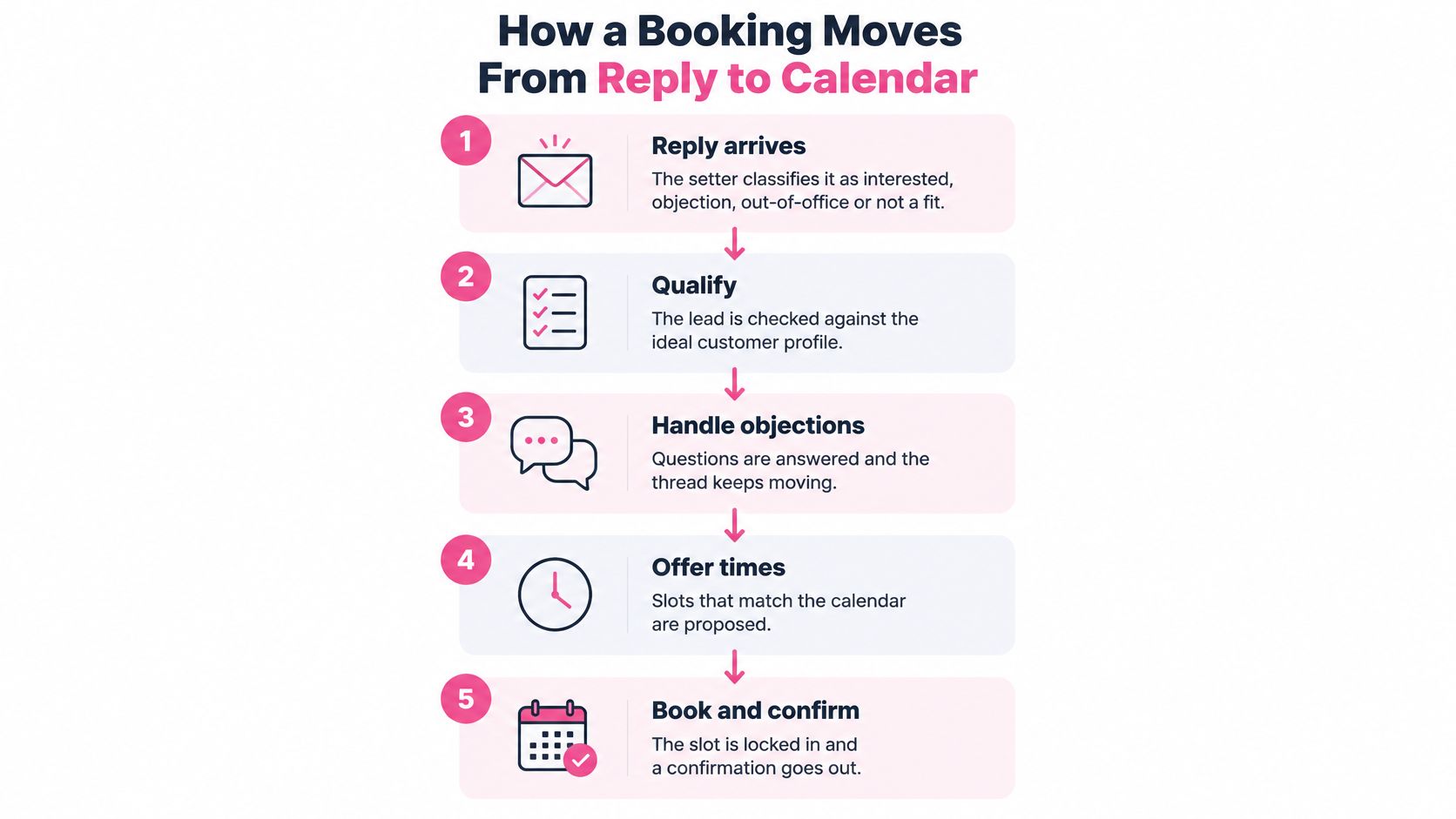
This overview shows the main stages, with the operational checks broken out below.
Follow the record, not just the reply
Classify the incoming message. Identify interest, an objection, an out-of-office response, or an unsubscribe. The failure to catch is treating an automated holiday reply as a buyer raising their hand.
Ask structured questions about company, role, use case, urgency, budget fit, and meeting objective. Keep the exchange conversational rather than delivering an application form; the failure is leaving a required field blank because the prospect sounded enthusiastic.
Check the answers against written criteria. Missing or conflicting information goes to a person before booking, and objections receive only approved answers. Otherwise, the system may convert an unknown into an unjustified yes.
Query real-time calendar availability and propose a small selection of suitable slots. Recheck the chosen slot before writing the event, because cached availability can leave you offering time someone else has already taken.
Confirm time zone, attendees, and meeting format in writing. A prospect choosing Tuesday afternoon hasn't necessarily chosen your Tuesday afternoon. Missing attendees can also turn a buying discussion into a preliminary introduction.
Write the booking to the calendar and notify the client immediately. Treat a failed calendar write or missing notification as an operational exception, not a successful booking with a minor technical footnote.
Log the outcome and qualification status. Include the reason for any decline and preserve the conversation context. Without that record, the salesperson inherits an invitation but has to reconstruct why the meeting exists.
A CareBuddy scheduling study describes an architecture with separate scheduling, inquiry, planning, and reminder agents coordinated by an orchestrator. It's a healthcare example, not evidence of B2B sales performance, but the separation of responsibilities is useful: calendar operations shouldn't become permission to make commercial commitments.
Rehearse the awkward messages
A demonstration should expose the handoffs, not just the smooth booking path. Use the video as a conversation starter, then inspect the records behind the interaction.
For a practical rehearsal, test the flow with five real replies before going live, removing sensitive details where necessary. Choose a mix that includes ambiguity and rejection, then compare logged outcomes with meetings that took place.
Bring those examples to a campaign walkthrough. A tidy demo is pleasant; a correctly handled messy reply is more informative.
Where Human Oversight Must Step In
Executives have become less comfortable handing agents the keys. In Capgemini's April 2025 survey of 1,500 executives, trust in fully autonomous AI agents fell from 43% to 27% in a year, while more than 60% expected human-agent teams within the following 12 months.
The useful question isn't whether AI should book meetings. It's which decisions the setter can make alone, and exactly what stops it from continuing.
Researching an account or suggesting a qualification question is different from telling a cybersecurity buyer that your contract satisfies their security requirements. One creates a draft. The other creates a problem with attendees.
Escalation triggers and handoff rules
| Trigger | Example reply | Handoff rule |
|---|---|---|
| Low classifier confidence | Reply mixes interest with a complaint | Human reviews within one working day |
| Negative sentiment | Prospect says to stop contacting them | Suppress the contact and confirm the opt-out |
| Repeated objection | Same price objection raised twice | Human takes over the thread |
| Pricing request | Prospect asks for a quote | Human only, never the AI |
| Legal or security commitment | Prospect asks for a data processing agreement or SLA | Human only, never the AI |
| Authority unclear | Assistant replies on behalf of the executive | Human confirms the decision-maker before booking |
These are proposed operating rules, not performance promises. Automated systems operate without continuous human oversight, can produce errors or unintended outputs, and guarantee no specific outcome. Handoff rules limit what the setter is allowed to do when uncertainty appears.
The opt-out row needs special treatment: suppression shouldn't wait for someone to read a review queue. Stop further outreach first, then handle any necessary confirmation without turning it into another sales pitch.
Make the handoff useful
Say an executive assistant offers a slot on behalf of a managing director. Automatically rejecting the reply would be clumsy, but automatically marking the assistant as the buyer would be equally wrong. A person should confirm who's attending and what decision the conversation supports.
For high-value prospects or sensitive industries, route the thread with a short summary, the triggering message, missing qualification fields, and a suggested next action. Escalation should reduce the reviewer's detective work.
Data handling deserves its own review. As an example of a published disclosure, you can browse the AI data practices from Chartsy, then identify the equivalent questions for your own stack: what information enters the model, what gets retained, and who can access the conversation.
A human-review queue with no named owner is just a slower way to ignore a prospect.
Report AI-only conversations separately from human-reviewed conversations. Compare completed qualified meetings, response delays, and reasons for rejection. If reviewed threads take longer but produce more relevant conversations, the delay may be worthwhile; if reviewers merely approve routine answers, tighten the rules instead of adding more approval clicks.
Deliverability Rules That Protect Every Booking
A managing director replies at 7:12, the junior hire answers at 7:13, and the message lands in spam because the domain never earned the right to move that fast. The rulebook did its job. The rails under it did not. Before polishing the setter's personality, make sure prospects can receive its messages.
Google's email sender guidelines set authentication and unsubscribe requirements for bulk senders and recommend keeping user-reported spam below 0.10%, while avoiding 0.30% or higher. For a simplified example involving 100,000 Gmail-delivered messages, those thresholds translate to fewer than 100 complaints for the working goal and 300 complaints at the danger threshold.
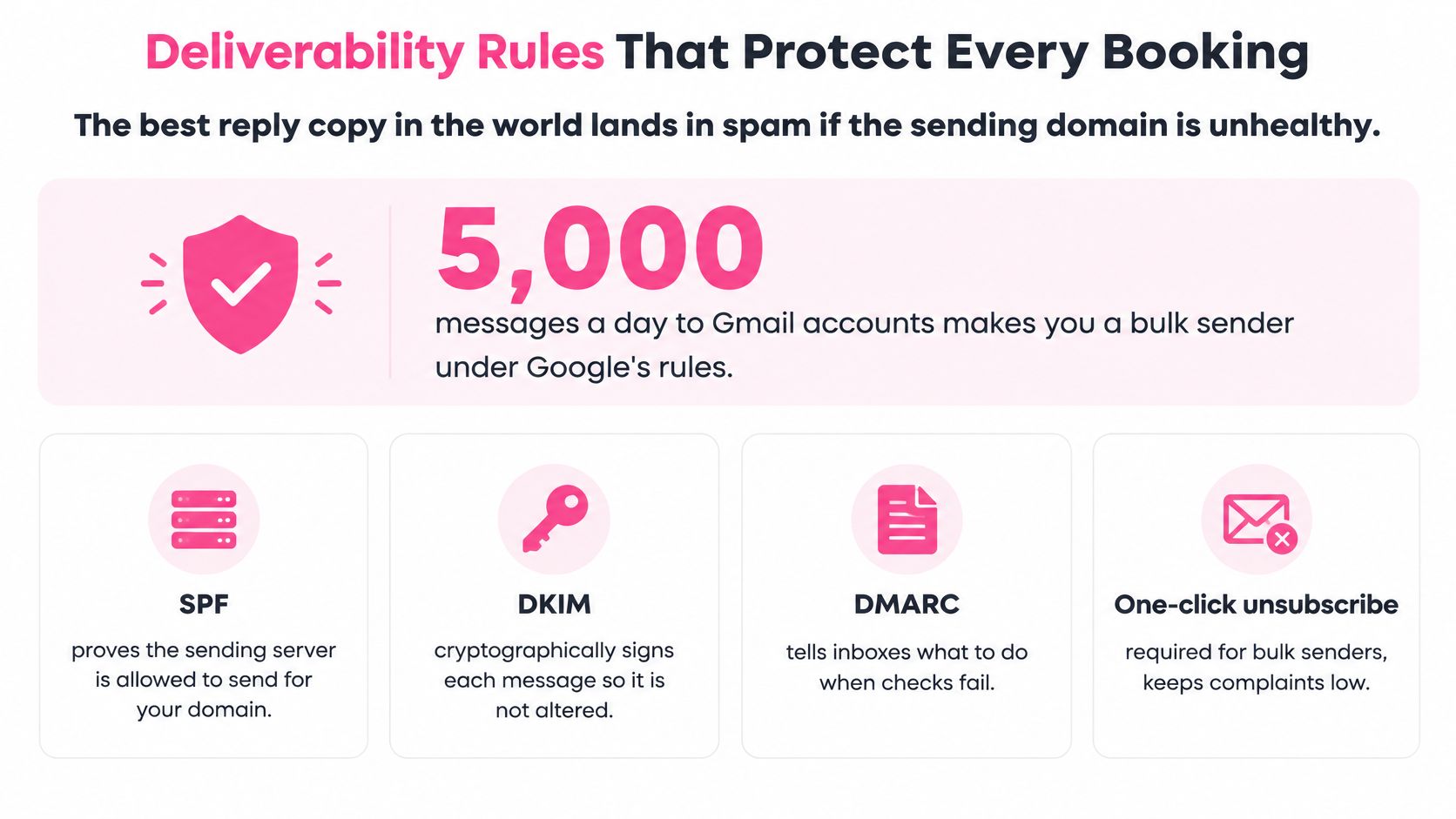
The visual summarizes the infrastructure you need to inspect.
Set up before you scale
- Configure SPF and DKIM. Check sender-domain alignment rather than assuming authentication alone is enough.
- Add DMARC for domain-level policy and reporting.
- Increase mailbox activity gradually. Don't launch a large campaign from an untested sending identity.
- Split traffic across controlled mailboxes with clear ownership and volume controls. This isn't permission to evade spam enforcement.
- Process opt-outs immediately. Support one-click unsubscribe where required and maintain suppression across campaigns.
- Monitor user-reported spam in Google Postmaster Tools, alongside authentication and delivery issues.
Gmail sender thresholds in numbers
| Rule | Threshold | What it means for your setter |
|---|---|---|
| Bulk sender definition | More than 5,000 messages a day to Gmail | Authentication and easy unsubscribe required |
| Spam rate goal | Below 0.10% user-reported spam | Keep as the working target for every campaign |
| Spam rate ceiling | 0.30% or higher | Loses mitigation eligibility and risks delivery |
| Recovery after the ceiling | Below 0.30% for seven consecutive days | Needs sustained improvement, not one fix |
The sender requirements come from Google's published bulk-sender guidance, and the recovery period is specified in Google's enforcement FAQ. Treat the complaint-count example as arithmetic, not a substitute for Google's reported measurement.
AI personalization can't repair weak authentication or a poorly targeted list. Have a person review targeting and suppress inappropriate prospects before raising volume. For the technical pass, compare the setup against a standalone email authentication and spam-rate checklist, then keep a named owner responsible for what the setter is allowed to send. Automated systems still operate without continuous human oversight, can produce errors or unintended outputs, and never guarantee a specific outcome.
Under the FTC's CAN-SPAM compliance guide, commercial email needs accurate From, To, Reply-To, and routing information, nondeceptive subject lines, a clear advertisement indication, a valid physical postal address, and an opt-out honored within 10 business days, with the mechanism working for at least 30 days after sending.
Schedule a weekly complaint review and monitor alerts between reviews. Pause volume when complaints climb, investigate the audience and message, and resume only after correcting the cause.
Measuring Whether the Setter Earns Its Place
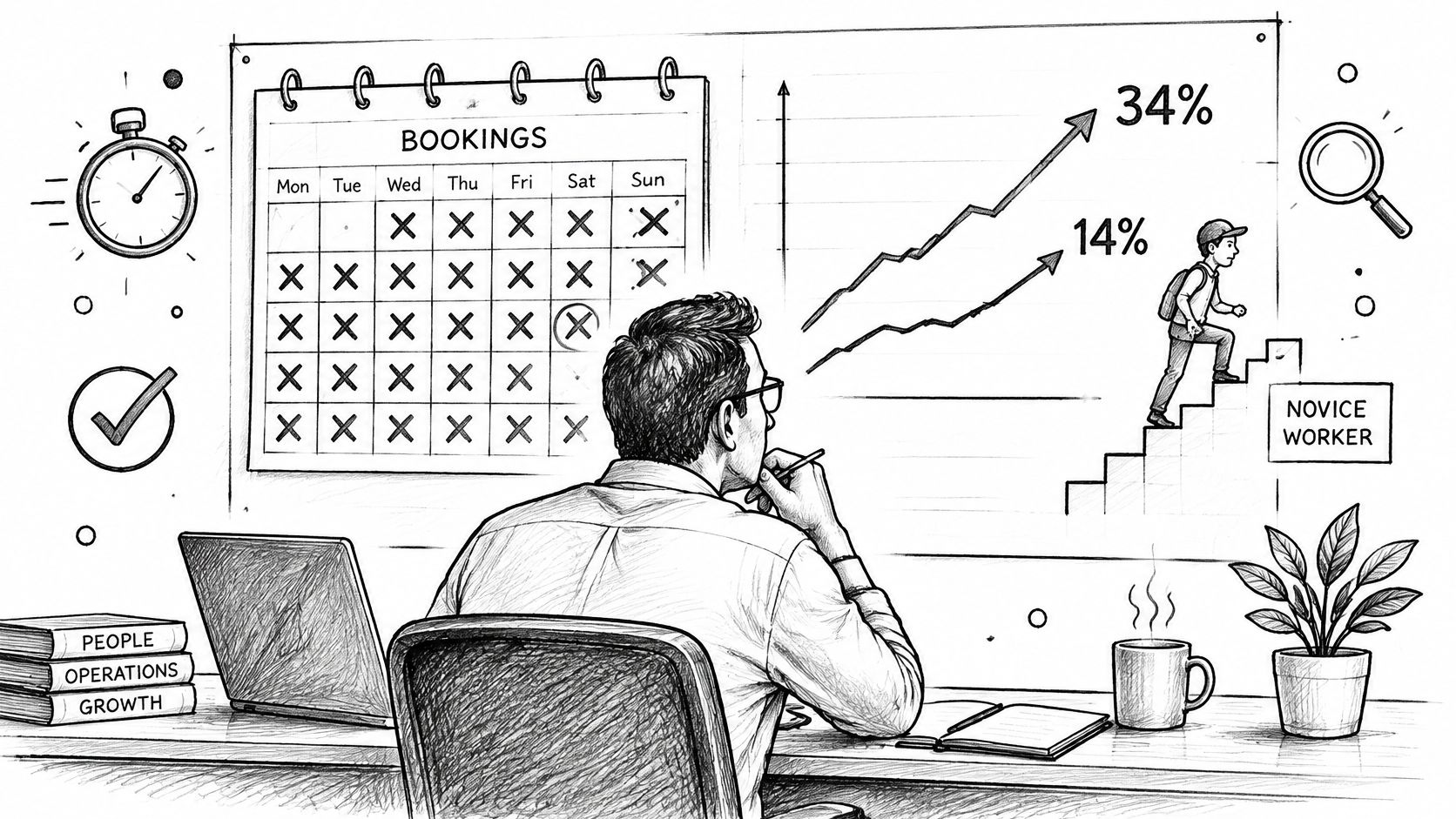
A field study of 5,179 customer-support agents, summarized by QEval, found that generative AI increased issues resolved per hour by 14% on average and 34% for novice and lower-skilled workers, with minimal effects for experienced, highly skilled workers. That's evidence of communication-work productivity, not proof that an AI appointment setter creates pipeline or closes deals.
The practical implication is narrower and more useful: routine replies and less-experienced operators may benefit from approved response patterns. Whether those efficiencies produce worthwhile sales conversations still needs measuring.
Use the calendar as an input to the scorecard, not the final verdict.
Metrics that show whether the setter works
| Metric | What it tells you | Warning sign |
|---|---|---|
| Raw bookings | Calendar entries created | Rising bookings with a flat show rate |
| Qualified-meeting completion | Meetings that match your criteria and actually happen | Meetings booked but canceled or no-shows |
| Reply handling time | Speed from reply to a response | Replies waiting longer than one working day |
| Escalation rate | Share of conversations routed to a person | Near zero, which means nothing is being checked |
| Spam complaint rate | User-reported spam per campaign | Above 0.10% |
| Opt-out processing | Time taken to honor unsubscribes | Anything beyond 10 business days |
The response-time warning is a proposed management standard, not a universal benchmark. The complaint and opt-out rows belong in the weekly sending review too, so the sales scorecard doesn't reward booking activity while overlooking sending problems.
A near-zero escalation rate deserves investigation rather than automatic applause. It may indicate that the setter isn't detecting ambiguity, although a routine conversation mix can also produce few handoffs.
Count the meetings worth having
Say a team books 40 calls in a hypothetical month, but only 12 happen and 3 are qualified. The booking report looks busy; the sales team received very little usable opportunity. Inspect attendance, targeting, and qualification separately rather than blaming everything on follow-up speed.
Use a meeting cost calculator to include preparation and attendance time in the evaluation. An irrelevant meeting still consumes a salesperson's afternoon, even if the software booked it cheaply.
Measure the finished job: A successful calendar write isn't the same thing as a completed qualified meeting.
Keep rescheduling ownership explicit. At Ever Outbound, we're pay-per-close, and we never move or cancel a booked meeting on the client's behalf. Clients contact prospects directly to rearrange.
Before judging performance, write down the qualified-meeting definition and establish a three-month baseline as your evaluation window. Record changes to targeting, copy, and qualification rules during that period so you don't credit the software for a better offer or blame it for a narrower market.
Confirm the Fit Before You Hand Over Your Calendar
Before you hand over your calendar, confirm the workflow and rules in writing. The software demonstration matters less than what happens when a prospect asks something awkward.
Start with escalation triggers. Name the reviewer, specify what information accompanies the handoff, and decide whether automated replies stop while the person reviews the thread. An unattended queue isn't supervision.
Put the agreement into operational terms
- Define the finished job: Write down what makes a meeting qualified, including relevant need, commercial fit, authority, and meeting objective.
- Confirm relationship ownership: Make clear who contacts the prospect when an appointment needs rearranging.
- Inspect a complete example: Follow the reply, qualification record, calendar entry, notification, and final outcome rather than judging only the chat transcript.
Use the distinction behind meeting-ready leads to keep the acceptance standard concrete. A willing attendee and a suitable buying conversation aren't interchangeable.
At Ever Outbound, we're pay-per-close. Our Scale + AI Setter plan costs $497 per month plus a 5% pay-per-close fee on closed deals and includes everything in Scale, plus automatic reply qualification, hands-off booking into your calendar, and 24/7 faster speed-to-lead. We can run this as a managed service; the commission applies only to deals you close, alongside the stated monthly plan charge.
Automated systems operate without continuous human oversight and may produce errors or unintended outputs. No specific outcomes are guaranteed. Human ownership means defined review and intervention, not a promise that somebody watches every response continuously.
Request a walkthrough of one sample campaign and check it against the stage table before you sign. Bring an awkward reply, not just a friendly one.
At Ever Outbound Inc., we're pay-per-close, offering managed B2B outbound with human research, copywriting, and AI-assisted appointment setting. Visit us to request a sample campaign walkthrough and inspect how qualification, escalation, and calendar booking would work for your sales team.