November 6, 2026
Boolean Search on LinkedIn: Operators That Work
You type cmo saas into LinkedIn, hit enter, and get a parade. There's a student who interned at a SaaS company once. There's a recruiter who hires CMOs. There's someone who, near as you can tell, just liked a SaaS post in 2022 and has been punished for it ever since.
That's not a search problem. That's a language problem. Boolean search on LinkedIn isn't a smarter keyword box, it's a tiny filter language with strict rules, a published order of operations, and hard limits that change depending on which product you're using. Learn the rules and page one starts looking like your target list. Ignore them and you'll keep sourcing recruiters and interns with great confidence.
Table of Contents
- The Operators LinkedIn Treats as Commands
- How to Run a Boolean People Search
- Operator Caps in Search Sales Navigator and Recruiter
- Hiring and Prospecting Strings You Can Paste
- When Titles Do Not Match Your Keywords
- Why Good Queries Still Return the Wrong People
- Stop Editing Strings and Start the Outreach
The Operators LinkedIn Treats as Commands
Start with the messy default. A plain keyword search matches words wherever they happen to sit on a profile, so your senior marketing leader search happily returns people who mentioned marketing in a summary, worked near a CMO, or recruit for one. Boolean fixes that by forcing LinkedIn to obey instructions instead of guessing at relevance.
The catch is that LinkedIn only obeys when you speak its dialect. According to LinkedIn's official Boolean search documentation, the system is built around three primary logical operators, AND, OR, and NOT, plus exact phrase quotation marks and parentheses for grouping, and operators must be written in uppercase for the platform to interpret them as Boolean commands.
That casing rule alone explains a lot of broken searches. Type and or or in lowercase and you're not issuing commands, you're adding flimsy little words. Type AND and every connected term becomes mandatory. Type OR and you're offering acceptable alternatives. Type NOT and you're evicting the term that follows it.
The card to keep beside the search box
Screenshot this one. It's the whole language, minus the parts people invent.
| Command | What it does | Rule | Fragment |
|---|---|---|---|
| AND | Requires every connected term | UPPERCASE | SaaS AND fintech |
| OR | Accepts any listed alternative | UPPERCASE | CMO OR "head of marketing" |
| NOT | Excludes the next term | UPPERCASE and immediately before the term | NOT recruiter |
| Quotes | Locks an exact phrase | Straight quotation marks | "sales operations" |
| Parentheses | Groups mixed logic | Only ( ) counts as a group | (SaaS OR software) |
| Brackets braces angles | No grouping effect | Treated as ordinary characters | Do not use [ ] { } < > |
| + and - | Not a supported shortcut | Officially unsupported | Do not rely on them |
Two rows in that table do the heaviest lifting. OR is how one search covers "chief marketing officer", CMO, and "head of marketing" without you running three separate hunts. NOT is how you stop page one from filling up with the people who hire for the role instead of the people who hold it.
Order matters more than cleverness
LinkedIn doesn't read your string left to right like a sentence. Quoted phrases and parentheses get resolved first, then NOT, then AND, then OR. So a missing pair of parentheses isn't a formatting quibble, it can change who qualifies and who gets cut.
That's why ("chief marketing officer" OR CMO) AND SaaS NOT recruiter works as a starter you can edit. The parentheses settle the title argument first, SaaS becomes mandatory, and recruiter gets shown the door. Remove the parentheses and LinkedIn starts making its own decisions about which parts of your logic belong together, which is generous of it and bad for you.
A few habits will save you grief:
- Quote every multi-word title: "chief marketing officer" stays together, chief marketing officer drifts apart into three loose words.
- Use only parentheses to group: Square brackets, curly braces, and angle brackets look technical and do nothing, because LinkedIn treats them as ordinary characters.
- Skip the plus and minus shortcuts: They may appear to work sometimes, but they aren't officially supported, and "sometimes" is a lousy foundation for a prospecting list.
- Put NOT right against its target: It excludes the term that follows it, so wandering placement gives you wandering results.
Treat this as a filter language, not a wish list. Once you're issuing commands LinkedIn recognizes, the next job is running a search without loading every condition into one box.
How to Run a Boolean People Search
You can finish a clean first pass in a few minutes. The goal isn't a beautiful string, it's a first page that mostly shows the job you meant, which you'll then fix with one change at a time instead of six panicked ones.
Here's the desk-side version of the flow before we walk it step by step.
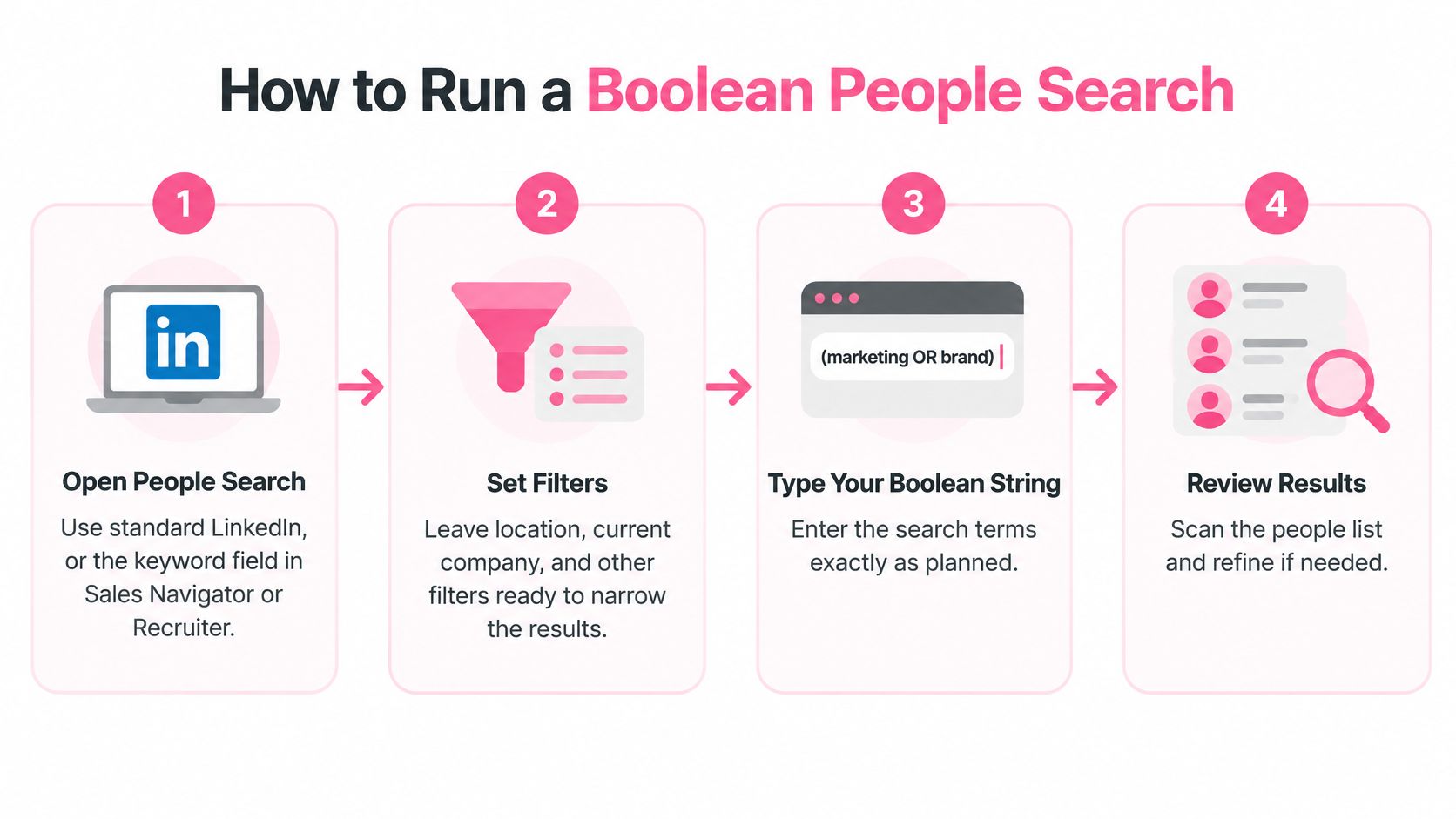
Six steps, one change at a time
- Open People search: Use standard LinkedIn, or the keyword field in Sales Navigator or Recruiter. Leave location, current company, and seniority to the dedicated filters so the keyword box isn't doing every job at once. Filters are transparent and easy to undo, a giant string isn't.
- Type your operators in uppercase: AND, OR, and NOT only. Lowercase versions may be ignored as ordinary words, which turns your precise query into a loose bag of keywords.
- Wrap multi-word titles in quotes: Use "sales director" and "VP sales" so the words travel together. Leave single tokens like SaaS bare, since there's nothing to hold together.
- Parenthesize each OR cluster first: Build ("sales director" OR "VP sales") before you attach anything else, then add AND SaaS. The group settles the title options before the rest of the logic touches them.
- Park NOT immediately before the unwanted term: Write NOT recruiter, or group several exclusions as NOT (recruiter OR student). Don't reach for a minus sign, it isn't the same thing.
- Run it and read only page one: Scan current titles, then change exactly one thing, one new synonym or one new exclusion. If you change four things and results improve, you'll never know which change earned it.
If the first page is not mostly the job you meant, do not add more logic. Remove a constraint.
That last step is where people go sideways. When results look wrong, the instinct is to pile on more quotes, more exclusions, more cleverness. Usually the string is already too tight or one clause is excluding the right people, so loosening beats decorating.
Build the muscle before the campaign
Run one unglamorous test string first, something like ("sales director" OR "VP sales") AND SaaS NOT recruiter, and watch what each edit does to page one. You're training your eye to recognize what happens when an OR cluster widens or a NOT clause bites, and that recognition transfers to every later search.
It also prepares you for the part that contacts people. If you're sourcing candidates rather than buyers, it's worth reading up on how to improve candidate outreach and conversion so a clean list doesn't die in sloppy messaging. And if you'd rather see how a managed team handles the channel end to end, our LinkedIn outreach system overview shows where list building hands off to outreach.
Once this sequence feels automatic, you're ready for the paste-ready strings further down. They'll make far more sense when you can already see why each clause is sitting where it sits.
Operator Caps in Search Sales Navigator and Recruiter
A string that runs happily in Recruiter can fail or need a haircut somewhere else, and the cap counts operators, not words. That's the trap. People count characters, feel safe, and then wonder why a perfectly reasonable query got clipped.
Put the limits in front of you first, then we'll talk about splitting.
| Product | Operator cap | What a long string needs |
|---|---|---|
| Standard LinkedIn search | Limited; exact number not published | Shorten or split so scraping limits do not clip it |
| Sales Navigator | 15 operators | Split titles from industry or tech into two searches |
| Recruiter | No limit | One complex string is allowed |
| Recruiter Lite | No limit | Same as Recruiter |
Per LinkedIn's Recruiter help documentation on Boolean limits, the consumer search engine limits the number of Boolean operators in one query partly to deter profile scraping and protect members, Sales Navigator permits a maximum of 15 Boolean operators in one search query, and Recruiter and Recruiter Lite have no Boolean-operator limit.
Why 15 disappears fast
Count what you're spending. A modest title list like CMO OR "chief marketing officer" OR "vp marketing" OR "head of marketing" has already burned three OR operators before you've added an industry term, a technology, or a single exclusion. Add AND (SaaS OR software) and a NOT cluster with two terms, and you're more than halfway to the cap while feeling like you've barely started.
If you prospect in Sales Navigator regularly, a reference like this guide to LinkedIn Sales Navigator for B2B prospecting helps you keep the product's quirks in view while you plan around that ceiling.
Split instead of squeeze
When a Sales Navigator string creeps toward 15, don't amputate your best synonyms. Split the search instead. Run one saved search for title variants and a second for technology or industry words, then compare who appears in both. The overlap is your working list, and neither half had to be starved to fit.
Keep the split reusable with two small habits:
- Name each half plainly: Save them as something like Titles and Industry so future you knows which is which.
- Rerun both in the same session: Comparing results from the same day keeps the overlap honest, since profiles and ranking shift.
The practical rule is simple. Write the ideal string in Recruiter where there's no ceiling, then cut or split it before you move it into Sales Navigator or standard search. Saved searches keep the string but not the cap, so recount the operators every time a saved search gets copied into another product.
Hiring and Prospecting Strings You Can Paste
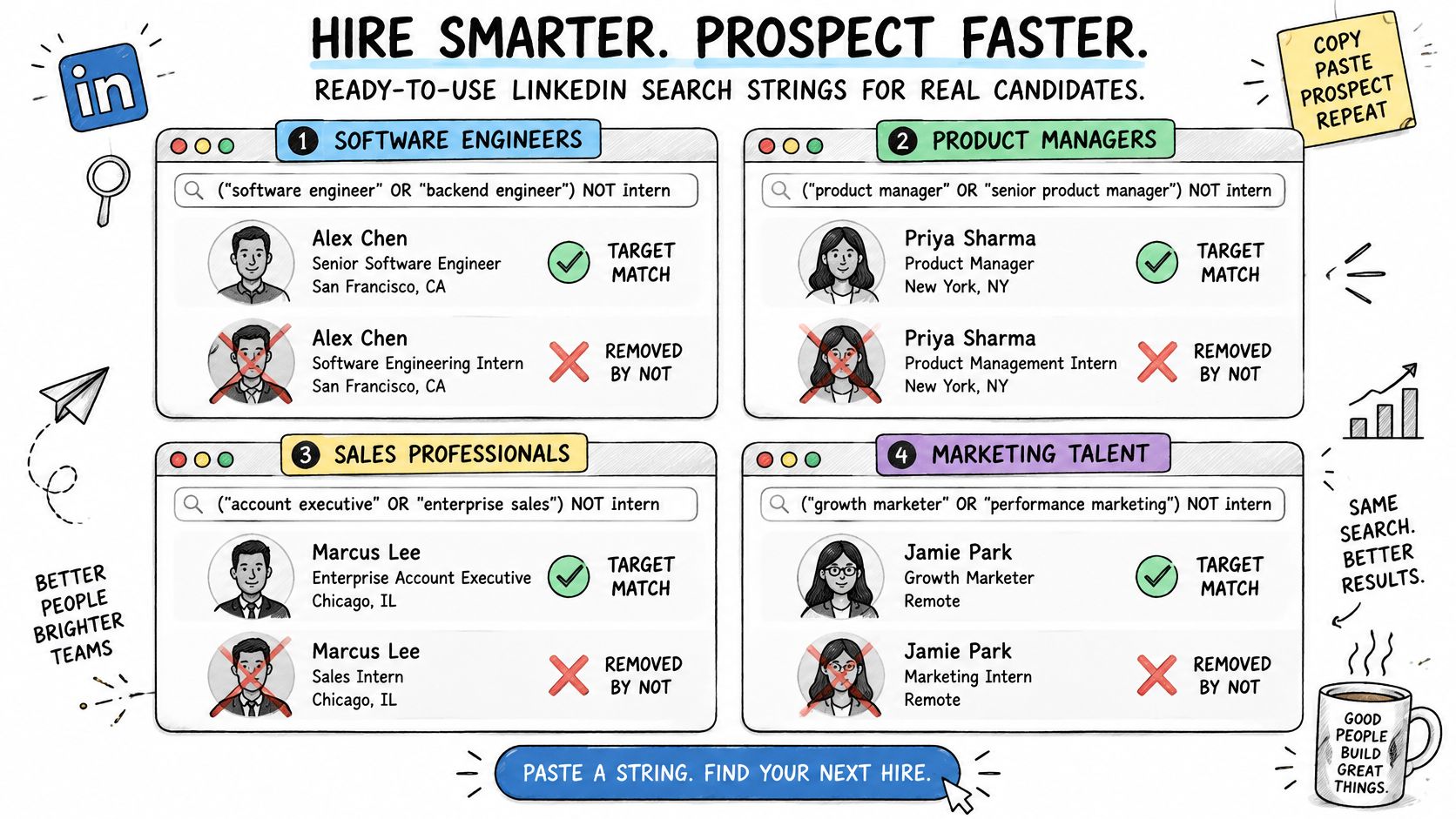
Enough theory. Below are four strings you can drop in as-is, one per campaign, each built to surface a specific person and kill a specific false friend. The NOT clause in every row exists because that noise shows up reliably on page one if you let it.
This visual walks through how these strings filter candidates before you borrow them.
| Goal | String | Should surface | Built to drop |
|---|---|---|---|
| Hire a SaaS account executive | ("account executive" OR "account exec") AND (SaaS OR software) NOT (recruiter OR "talent acquisition" OR student) | Current sellers in software | Recruiters and students |
| Hire a marketing leader | ("chief marketing officer" OR CMO OR "head of marketing") AND (B2B OR SaaS) NOT (recruiter OR intern) | Senior marketing titles in B2B or SaaS | Recruiters and interns |
| Prospect RevOps buyers | ("Revenue Operations" OR RevOps OR "Sales Operations") AND (SaaS OR software) NOT (recruiter OR student) | Ops leaders at software firms | Recruiters and students |
| Prospect agency founders | (founder OR "co-founder" OR owner) AND (agency OR consultancy) NOT (intern OR student OR recruiter) | Owners of agencies or consultancies | Interns, students, recruiters |
Read the table like a casting call. The SaaS account executive string drops recruiters, talent acquisition staff, and students because sales titles attract all three like a porch light attracts moths. The marketing leader string keeps senior B2B or SaaS titles and removes the intern who has "future CMO" energy in their headline.
The RevOps string is the prospecting twin of the hiring ones, same bones, different intent. If you want timing signals layered on top of a title list like that, this piece on signal-led LinkedIn prospecting is a useful companion. For teams hiring in this space specifically, our recruiting and staffing outreach page covers how that sourcing work gets handled for staffing firms.
Prefer watching a string get built before you trust one? This walkthrough shows the mechanics in motion.
Two cautions before you paste anything. First, a bare AE token can match unrelated initials and stray abbreviations, so prefer the quoted "account executive" when the short form gets noisy. Second, the founder string still needs a manual pass, because owner shows up on freelance side projects and one-person ventures that aren't agencies in any useful sense.
Save only the string that matches your campaign. Blending hiring logic and buyer logic into one mega-query gives you a list that's wrong for both conversations, and no amount of parentheses will rescue a string that doesn't know what it's for.
When Titles Do Not Match Your Keywords
Here's the limitation nobody puts on the cheat sheet. A perfect string still can't read a profile that never uses your words. Boolean search on LinkedIn is keyword matching, full stop, and OR only widens the net among the spellings you personally thought to list.
This comparison shows why clean logic still misses people whose profiles use different words.
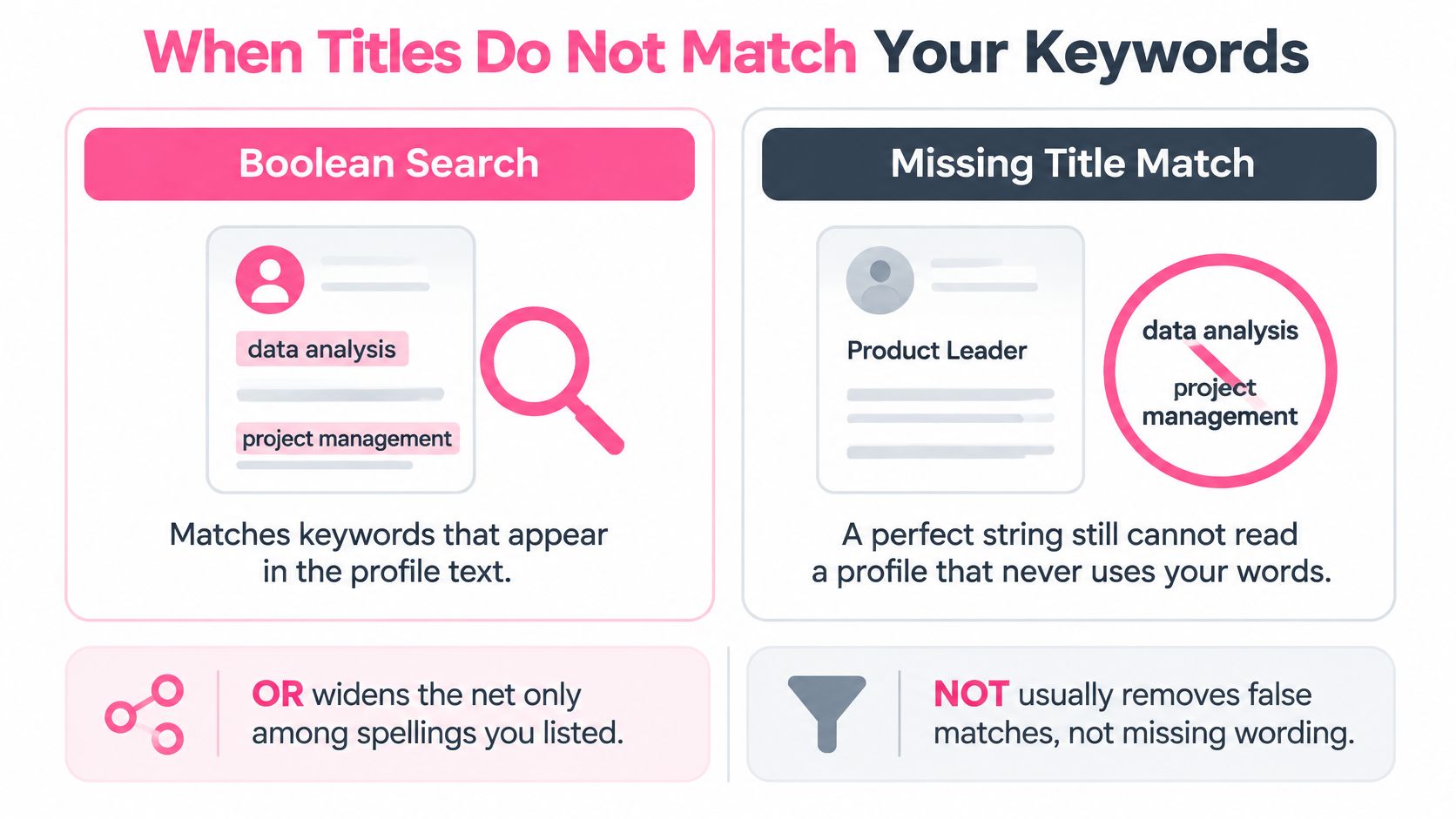
Say your ideal buyer runs revenue operations but their headline says "I run pipeline" and their title is something inventive their CEO coined at an offsite. Your string sailed right past them, and it did exactly what you told it to do. The same goes for local-language job names, in-house abbreviations, and outcome-oriented headlines that describe results instead of roles.
Geography makes it worse. Managing Director, Country Manager, and General Manager can all be the same seat with the same authority in different markets. Meanwhile founder, principal, and partner sound interchangeable and absolutely aren't, since each implies different buying power depending on the industry. One title list built for US SaaS will misread half of that.
Run a comparison, not an argument
Documentation for LinkedIn's AI-assisted search in Recruiter confirms that Boolean search remains available in LinkedIn Recruiter, including alongside AI-assisted search, and users can enter a Boolean string and choose a traditional keyword search instead. So this isn't Boolean versus AI. It's a controlled comparison you run on the same ICP.
Set it up like this:
- Run both passes: Your Boolean string, then an AI-assisted or filter-led search aimed at the identical audience.
- Count three things: Unique qualified profiles from each method, false positives you'd never message, and the segment only one method found.
- Keep each tool on its best job: Boolean handles explicit titles, technology tokens, and hard exclusions. Filters or AI surface the semantic neighbors your word list missed.
- Validate before scaling: Manually check a sample from the AI side before anyone gets messaged, since "related" and "right" aren't synonyms.
That last discipline is what turns a search into meeting-ready leads instead of a long list of almosts. Store separate search modules by geography and vertical as you learn, so a title list tuned for one market doesn't get forced onto another where the same words mean a different job.
More synonyms will not catch everyone. Accepting that, and measuring what each method uniquely finds, is how you stop mistaking a tidy string for complete coverage.
Why Good Queries Still Return the Wrong People
The most expensive mistake is also the best dressed one. You stack exact phrases and exclusions until the string looks surgical, run it, and get almost nobody. It feels precise. It's mostly just empty.
Diagnose by symptom before you rebuild anything.
| What you see | Usual cause | Fix |
|---|---|---|
| Zero or almost zero results | Lowercase operators or too many exact phrases | Uppercase the operators and drop one quoted phrase |
| A page of recruiters | NOT ignored or placed away from its term | Put NOT immediately before the term it excludes |
| A known buyer is missing | An exclusion matched old experience | Remove NOT agency and label the first 50 again |
| Results ignore your OR cluster | Mixed logic without parentheses | Group the alternatives in parentheses before AND and NOT |
According to LinkedIn's Boolean search guidance for its marketing and search products, the documented precedence runs quotes first, then parentheses, NOT, and AND, followed by OR, and common failure modes include lowercase operators which may not function as Boolean operators.
The 50-profile precision test
Stop arguing about whether a string is good and measure it. Build three versions for the same campaign, broad, balanced, and narrow, then label the first 50 profiles in each as qualified or not. Precision is qualified profiles divided by the 50 reviewed. Then check coverage by confirming your known target accounts and contacts still appear in each version.
That gives you a success rate tied to your campaign instead of a fantasy benchmark. Log the query version, your sample labels, the reason behind each exclusion, and your acceptance rule, then retest after every new synonym. If your list needs scrubbing after the fact, a lead list cleaner helps, but catching the bad clause upstream is cheaper.
If a known good account vanishes, the exclusion is the suspect, not the market.
Watch NOT agency in particular. It removes legitimate SaaS buyers whose profiles still mention agency experience from an old job, people who are exactly who you want now. Keep these traps separate from a bad ICP too, a string can faithfully execute a flawed targeting idea, which is a strategy problem wearing a syntax costume.
Stop Editing Strings and Start the Outreach
Here's the decision, plainly. If your balanced string puts known accounts on the list and the first 50 profiles are mostly the right role, stop adding synonyms. You're done searching and you're now procrastinating with parentheses.
Save the broad, balanced, and narrow versions in your research log, message from the balanced list, and hold the narrow one for a second pass. If page one still shows the wrong job after one change, go back one exclusion instead of writing a longer string. Shorter and understood beats longer and mysterious every time.
Only a bottleneck outside the operators changes the next move. When the main constraint is list building, copy, and follow-up rather than search syntax, that's where a handoff makes sense. At Ever Outbound, we're pay-per-close, so the fee is a commission when a deal closes from the work, and the first two closes are commission-free. Our team hand-picks and verifies decision-makers using AI-enhanced targeting, then runs LinkedIn outreach alongside cold email, with LinkedIn campaigns launching within 72 hours and email about 14 days after onboarding while domains warm up. You can see exactly how Ever Outbound works before deciding anything.
I would keep your next move small either way. Pick the balanced string, save the people who pass the 50-profile rule, and either book the calls yourself or hand that ICP to a pay-per-close team. The string was never the business. The conversations are.
Stop losing hours to strings that return recruiters and interns while your actual buyers stay invisible. Ever Outbound Inc. builds your verified decision-maker list and runs the LinkedIn and cold email outreach for you on a pay-per-close basis, so you only pay commission when a deal closes, with your first two closes commission-free. Bring us your ICP and we'll turn that Boolean string into booked calls on your calendar.