November 1, 2026
Hard Bounce vs Soft Bounce: Causes, Fixes and Sender Risk
Say your campaign goes out to 2,000 prospects and a few hundred bounce notices come back. Your dashboard looks alarming, your sales team wants another batch, and someone suggests deleting every address that failed.
Don't do that yet. In the hard bounce vs soft bounce distinction, the useful question isn't whether delivery failed. It's whether you need to fix the contact data, wait for the recipient, or change how you're sending.
Table of Contents
- Hard Bounce vs Soft Bounce at a Glance
- The SMTP Codes That Separate the Two
- Bounce Benchmarks and What They Signal
- How to Handle a Hard Bounce Step by Step
- Why Soft Bounces Hurt and How to Manage Them
- Which Bounce Scenarios Need Which Response
- Audit Bounces Before the Next Send
Hard Bounce vs Soft Bounce at a Glance
Hard bounce vs soft bounce compared
| Criterion | Hard Bounce | Soft Bounce |
|---|---|---|
| Failure type | Permanent | Transient |
| Enhanced code class | 5.x.x | 4.x.x |
| Typical causes | Nonexistent mailbox, invalid destination domain, policy rejection | Mailbox full, server busy, temporary service unavailable, throttling |
| Will resending unchanged work? | Unlikely | Often, after a delay |
| Default retry behavior | No retry; stop sending | Retry with delays |
| Default action | Suppress the address after checking the code | Retry, limit the window, then suppress if it persists |
| Effect on sender reputation | Repeated attempts can signal poor list quality | Repeated attempts can signal throttling or blocking |
A hard bounce indicates a permanent delivery failure, so resending the message unchanged is unlikely to work. A soft bounce indicates a temporary failure, and a later attempt may succeed. SMTP enhanced status codes distinguish permanent 5.x.x failures from transient 4.x.x failures.
The same bounce percentage can point to different problems: stale contact data, recipient-side throttling, or a sending reputation issue. Treat the bounce as a diagnosis, not a verdict on the address. The dashboard label is a summary; retain the underlying response because platforms can apply their own retry and reporting rules.
The trade-off behind the label
Suppress too aggressively and you may discard reachable prospects. Retry too aggressively and you may keep sending into a problem that needs investigation. The right response depends on the code and the recipient's situation, not the label alone.
For a broader troubleshooting checklist alongside your bounce review, Netco Design LLC's email deliverability tips for busy marketers can help organize the surrounding checks.
Practical rule: Use the code to choose a first action, then check whether the recipient's circumstances support it.
Treat the table's defaults as starting points. A permanent failure does not always mean the person is unreachable, and a temporary failure does not guarantee delivery on a later attempt.
The SMTP Codes That Separate the Two
Read a bounce notice in this order:
- Find the enhanced code, usually the dotted code following the basic SMTP reply.
- Check the subject digit, which separates addressing, mailbox, network, and security conditions.
- Map the response to an action, using both the code and the accompanying explanation.
A basic reply such as 550 gives you a broad result. The enhanced code that follows provides more detail: its first component identifies the failure class, its second identifies the subject, and its third identifies the specific condition, as explained in Nylas's guide to bounce codes.
SMTP codes and the action each one calls for
| Code | Bounce Class | Typical Meaning | Action |
|---|---|---|---|
| 550 5.1.1 | Hard | Unknown recipient mailbox | Suppress the address |
| 550 5.1.2 | Hard | Nonexistent destination domain | Suppress and check the domain for the whole list |
| 5.7.x (policy or authentication) | Hard-coded, but diagnose first | Recipient or security policy rejected the message | Keep the contact; fix SPF, DKIM, DMARC, content or reputation |
| 421 | Soft | Temporary service unavailable | Retry with backoff |
| 450 | Soft | Mailbox temporarily unavailable | Retry within a bounded window |
| 451 | Soft | Local processing error on the recipient side | Retry within a bounded window |
| 452 | Soft | Mailbox full | Retry later; suppress only if it persists |
Read the explanation, not just the first digit
The IANA classification reproduced in Google's SMTP error reference defines 5.XXX.YYY as a permanent failure unlikely to resolve by resending unchanged. Temporary responses cover conditions such as a busy, unavailable, or technically troubled receiving server.
Permanent describes the delivery attempt under its present conditions. It doesn't establish that the prospect has left the company, that the mailbox never existed, or that your lead supplier made a mistake.
When the response points toward domain or authentication trouble, SiteAlive's introduction to DNS provides useful background before you review the domain with whoever manages it. Keep that investigation separate from contact suppression.
The important exception is 5.7.x. That's a policy or security decision about the message, not proof that the recipient address is dead. Deleting the prospect may make your dashboard quieter while leaving the sending problem untouched.
Bounce Benchmarks and What They Signal
Published bounce benchmarks by source
| Source | Year | Hard Bounce | Soft Bounce | Overall Bounce |
|---|---|---|---|---|
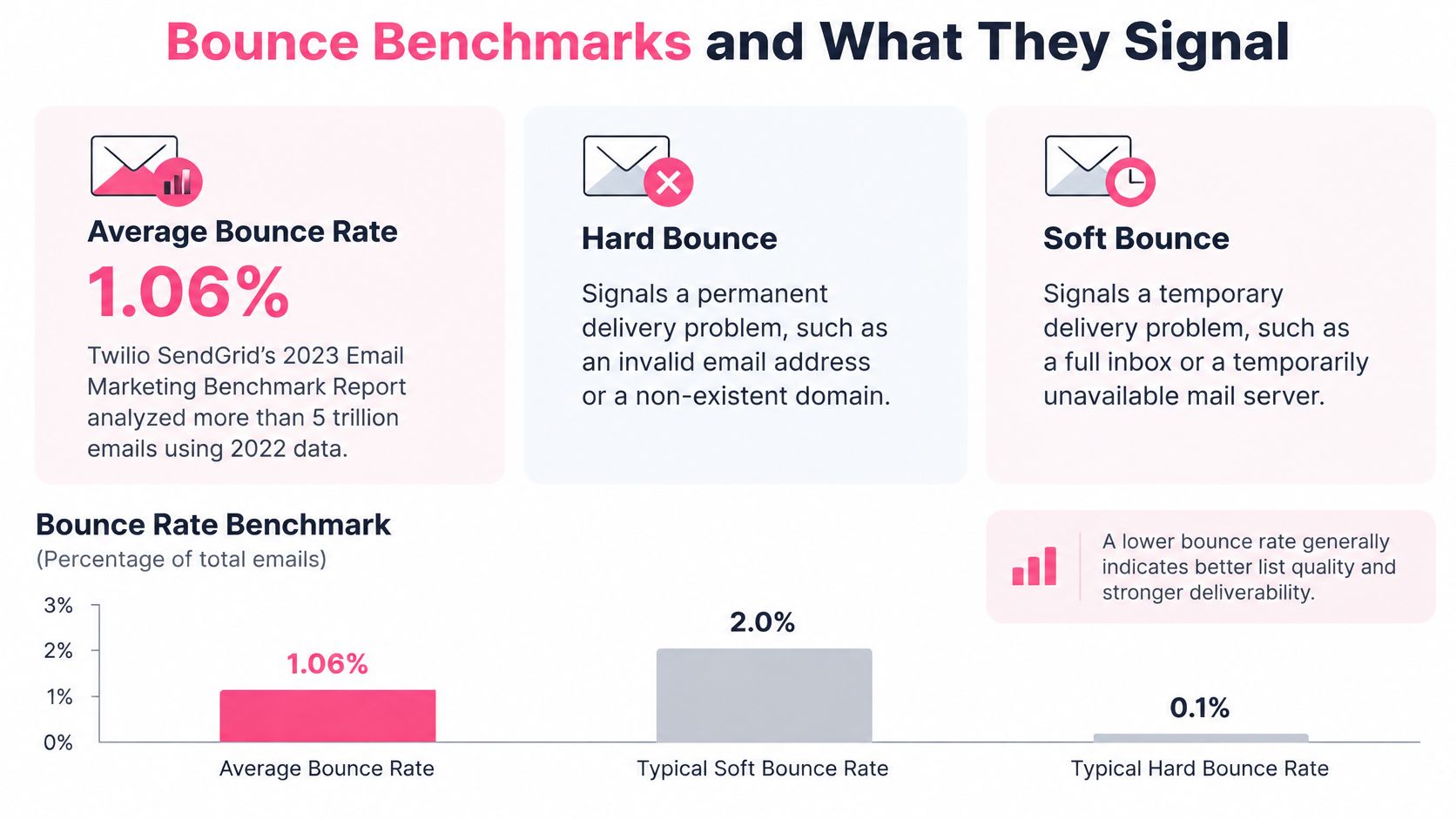
| Twilio SendGrid Email Marketing Benchmark | 2023 (2022 data) | Not split | Not split | 1.06% average, 0.21% median |
| GDMA International Email Benchmark, published by FlexMail | 2024 | 0.44% | 0.33% | Not separately stated |
| Mailmodo State of Email | 2024 | 0.2% | 1.2% | Not separately stated |
| Validity Benchmark, permission-based sends | 2025 | Not split | Not split | Around 1.5% |
Twilio SendGrid's report analyzed more than 5 trillion emails using 2022 data. Its average represents roughly one undelivered message per hundred sent, while the much lower median puts at least half of the measured sending populations at or below that level.
The infographic highlights the overall reference point without pretending every failure has the same cause.
Use benchmarks as context, not permission
The split differs substantially between the GDMA and Mailmodo reports. In Mailmodo's figures, soft failures are six times hard failures. That's a reason to inspect methodology and audience, not to crown one universal bounce-rate target.
These populations aren't a promise about your next outbound campaign. Permission-based marketing, prospecting, different provider mixes, and different reporting windows don't produce interchangeable measurements.
For your own reporting, separate:
- Data-quality signals: Address-level permanent failures, especially when concentrated in a list source.
- Recipient-availability signals: Mailbox capacity problems or temporary outages.
- Sending-system signals: Deferrals clustered around a provider, sending domain, or volume change.
Build a view by mailbox provider, SMTP code, campaign, recipient domain, and time window. Keep the denominator consistent, too: don't compare a report of final failed messages with a log that counts every deferred attempt.
Use the outbound volume planner when revising capacity after that review. Plan around what your infrastructure can support, rather than the number of records waiting in your CRM.
A low hard-bounce rate proves less than you'd like. A server can accept your message without putting it in the inbox.
Compare bounce trends with complaint rates, authentication alignment, and inbox placement. A tidy list won't compensate for a sending program that recipients don't want or providers don't trust.
How to Handle a Hard Bounce Step by Step
Start with the server response, not the delete button. Microsoft's managed suppression guidance distinguishes address failures from authentication and policy rejections, which need different treatment.
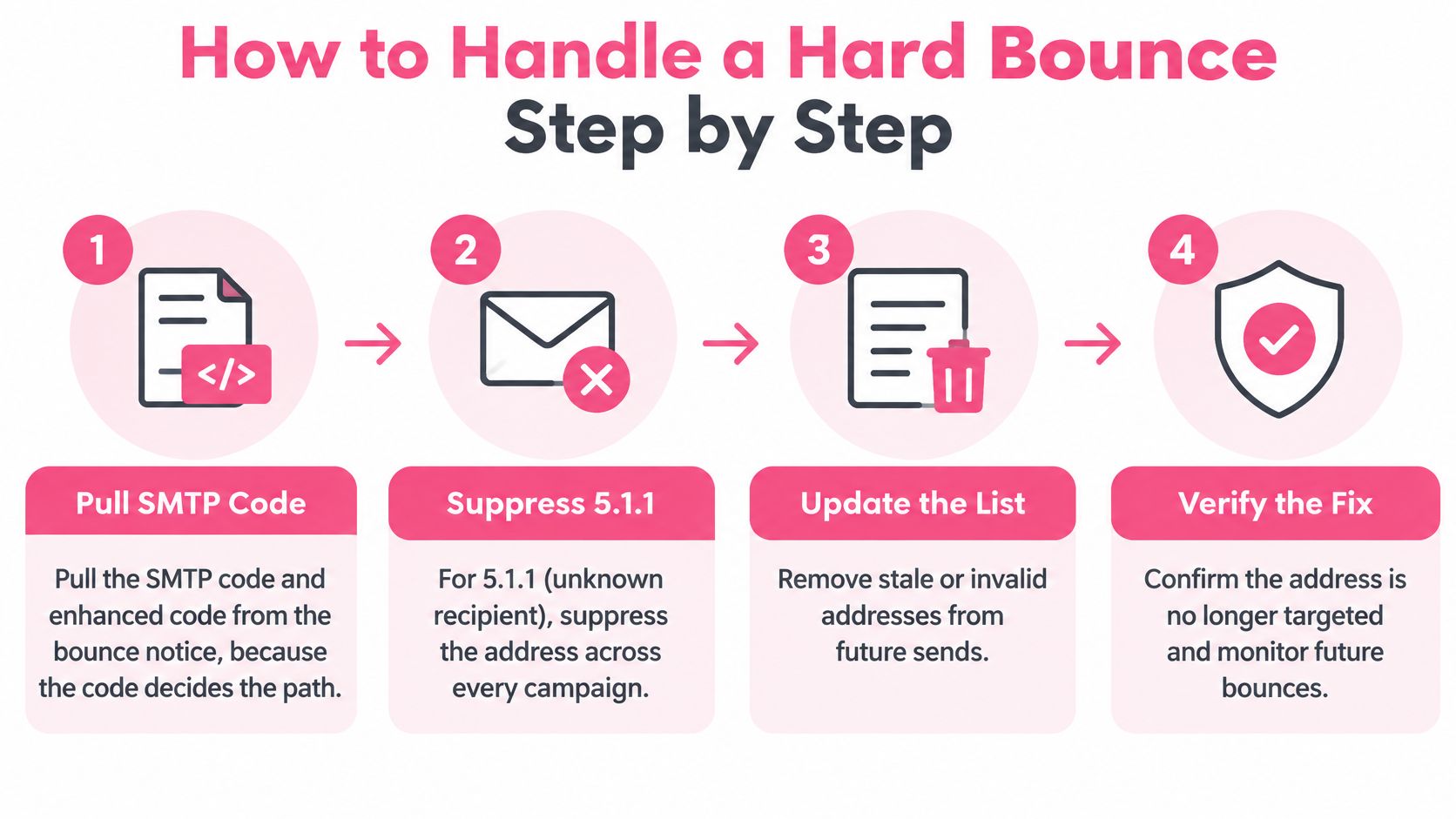
Pull the complete response. Save the SMTP reply, enhanced status code, and explanatory text before changing the contact record. The common slip is relying on a dashboard's hard-bounce badge and losing the detail that explains what failed.
Suppress unknown recipients everywhere. For 5.1.1, block the address across campaigns, scheduled follow-ups, and imported audiences because another sequence may still target it. Archiving it in only the campaign that bounced leaves the same mistake queued elsewhere.
Investigate a nonexistent destination domain. For 5.1.2, suppress the address and inspect the domain for a typo or genuine disappearance. If the domain is gone, remove its other contacts from future sends; don't mistake a bad domain for an isolated mailbox problem.
Keep policy-rejected contacts while fixing the cause. For 5.7.x, check SPF, DKIM, DMARC alignment, message content, and sending reputation, then retest cautiously after making a relevant correction. The expensive slip is deleting a valid decision-maker while continuing to send the same rejected message to everyone else.
Record enough context to recognize recurrence. Log the code, mailbox provider, campaign, date, and suppression reason in a shared record. A bare suppressed flag won't tell a colleague whether they're dealing with an invalid mailbox, a domain issue, or a policy investigation.
Re-verify only after something changes. Correct the address, resolve the domain issue, or repair the sending fault before considering another attempt. Don't resend an unchanged message after a permanent failure just because a new campaign has started.
Verify the suppression workflow
This visual summarizes the address-failure path. Policy rejections still need the separate diagnostic branch.
Use the lead list cleaner during list preparation, then check the actual campaign queue. Cleaning a file doesn't establish that every connected sending tool has honored your suppression decision.
The quick test: if the same hard bounce keeps appearing after suppression, the address isn't your only problem. Inspect CRM syncs, duplicate records, pending jobs, and reimports before approving another batch.
Why Soft Bounces Hurt and How to Manage Them
A campaign doubles its volume, then temporary-service responses spike. That pattern points to a delivery problem worth diagnosing, not a batch of dead addresses. Soft bounces can reflect throttling, a full mailbox, or a sending-side issue, and the code alone may not identify which one.
Google's guidance on Gmail temporary failures describes temporary failures as a throttling tool and warns that permanent failures may follow if senders do not reduce their rate. Google recommends exponential backoff, increasing the delay between retries. In some cases, pause briefly, then resume at a slower rate.
In the volume-spike example, another verification pass may not help. Reduce the rate, observe whether deferrals clear, and compare the response with the sending change.
Diagnose before scheduling another attempt
A full mailbox may clear with time. Provider-wide deferrals call for a review of sending behavior, while repeated authentication-related failures need a technical investigation. The same soft-bounce percentage can point to different causes, so avoid treating every affected address as invalid.
Keep the receiving server's text alongside the code. A temporary classification means a retry may work; it does not show whether waiting alone will solve the problem.
Tag each failure by code and explanation. Separate 421, 450, 451, and 452 responses rather than storing them all as soft bounces. Record the recipient domain and mailbox provider too, so a provider incident does not look like unrelated contact failures.
Retry with increasing delays. An illustrative schedule might wait fifteen minutes, then an hour, then several hours, rather than retrying in a tight loop. This is an operational example, not a universal provider requirement. Check the existing queue before adding manual retries to avoid overlapping attempts.
Reduce volume where failures cluster. If a provider starts deferring messages, lower traffic to that provider instead of deleting its recipients. Google's sender guidelines recommend reducing volume until SMTP errors decrease, then increasing slowly. If errors persist at low volume, inspect individual messages.
Set a bounded retry window. A window of a few days can work as a campaign policy if you document it and account for your platform's behavior. Don't let each new sequence restart the clock, or retries can continue indefinitely.
Suppress persistent failures after the window closes. Treat unresolved recipient-level failures as ineligible for future campaigns, while retaining their original temporary codes in your logs. Don't relabel the evidence as proof that a mailbox never existed, and don't suppress an entire provider's contacts when your own infrastructure remains blocked.
Investigate provider-wide authentication patterns. Check SPF, DKIM, and DMARC alignment when failures concentrate at one provider, especially across otherwise unrelated recipient domains. Correct the sending-side issue before using recipient suppression to avoid addressing it.
Choose a window you can actually enforce
Email platforms do not all use the same retry duration. Spotler's guide to email bounces notes that Salesforce retries soft bounces for up to 72 hours, while Mailchimp may eventually classify persistent soft bounces as hard bounces and suppress them.
That difference affects campaign operations. A contact may remain in a delivery queue after a campaign report looks settled, or a platform may reach its retry limit before your team begins an investigation.
Record the first failure, latest attempt, next scheduled retry, and cutoff. Assign one person to extend or end the window, and document the reason for any exception.
Retry discipline: A temporary rejection is permission to try later, not to keep knocking faster.
Two costly mistakes are common in bounce handling: treating one full-mailbox response as proof that a contact is dead, and retrying a throttled provider at the original rate. Both ignore what the failure pattern can reveal.
Separate message review from infrastructure review
When a response suggests a message-related problem, review the subject line, body copy, and sender identity against the failure pattern before retesting. A revised subject line does not show that authentication, sending rate, or reputation has been repaired. A cold email copy grader can help structure that review.
Keep a small change log: what changed, where it changed, and what response followed. Changing the list, copy, sending domain, and volume simultaneously makes it harder to identify which correction mattered.
Write down the retry window and escalation rule before the next campaign. The window is a judgment call; following it should not be.
Which Bounce Scenarios Need Which Response
Read the pattern before acting on the individual notice. These cases look similar in a campaign dashboard but require different owners and different fixes.
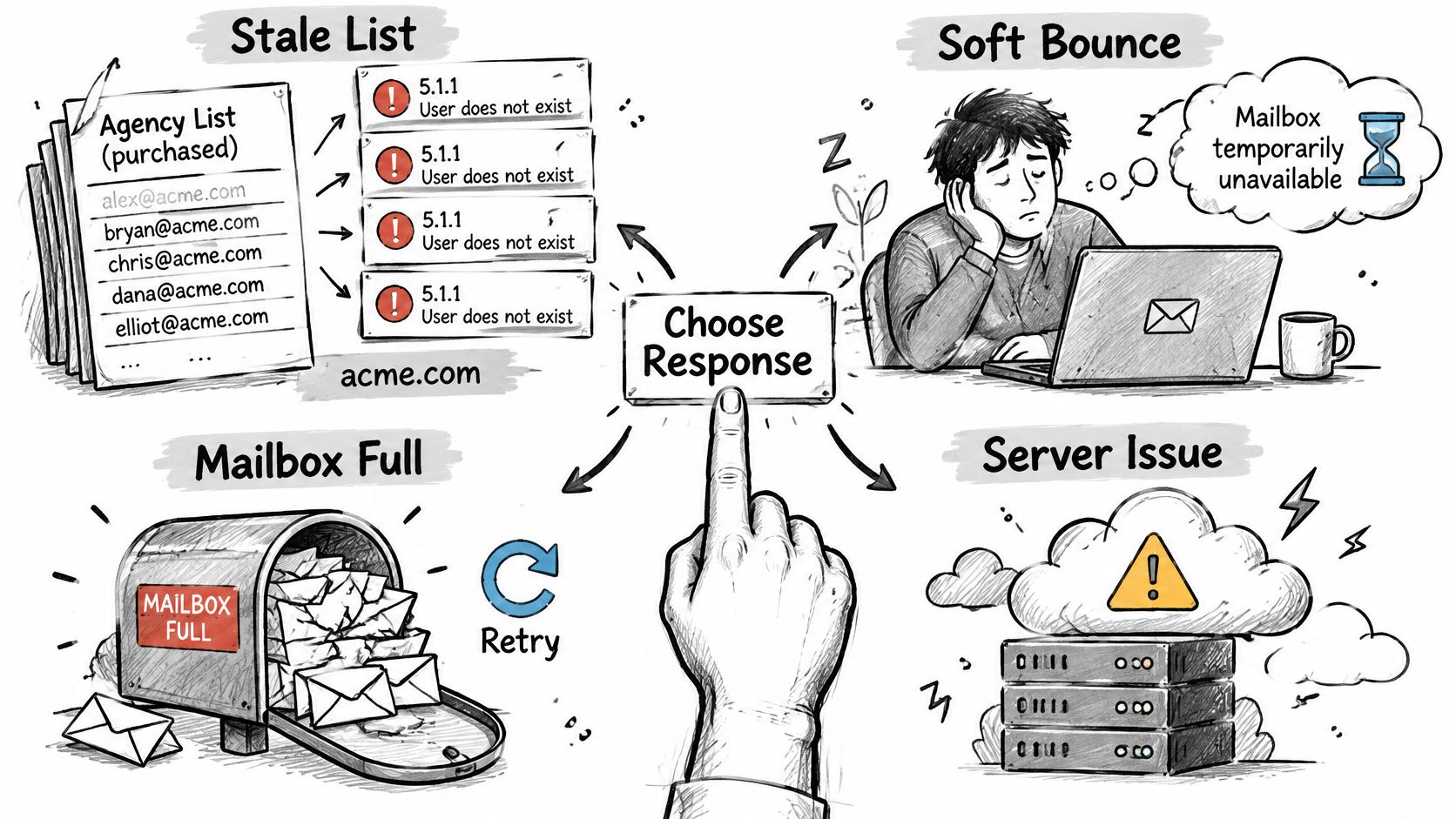
Match the response to the evidence
A purchased agency list produces unknown-recipient notices across one company domain. The pattern suggests stale contact data, particularly if the source supplied former employees. Apply the hard-bounce procedure's unknown-recipient suppression step and review the supplier's records before importing more. A cluster at one company doesn't establish that its entire domain is gone.
A Gmail-heavy campaign starts deferring messages after volume doubles. Treat throttling as the leading explanation, then test it by cutting the rate and using backoff. Apply the soft-bounce volume-control step rather than paying to clean already-valid addresses. If the error rate doesn't improve, inspect the response text for another cause.
A key executive receives a policy rejection at a known-valid address. Keep the contact and use the hard-bounce procedure's authentication and content branch. The sending owner needs to resolve the rejection; the account executive doesn't need to invent a replacement address.
A finance director's mailbox repeatedly reports that it's full. Keep the contact eligible for delayed retries while the agreed window remains open. Apply the soft-bounce window rule, then suppress future attempts if the failure remains unresolved at cutoff. Don't delete the relationship history just because the mailbox can't currently accept another message.
The useful distinction is between a working diagnosis and a proven cause. Timing, concentration, and the result of a controlled correction make your diagnosis stronger than the dashboard label alone.
Key differentiator: A single code tells you what the server said. A repeated pattern across providers, days, and campaigns helps explain why it's happening.
Audit Bounces Before the Next Send
Pull the last thirty days of bounce logs as a practical review window, then work through the failures before authorizing another campaign. Export the raw responses as well as the summary totals.
Split the logs by code, provider, and campaign. Preserve recipient domain and sending identity so you can distinguish a bad list import from a provider-specific incident.
Suppress confirmed address-level failures across all sequences. Review addressing codes carefully rather than applying a blanket rule to every permanent rejection. Confirm that pending follow-ups and connected tools honor the same suppression record.
Put policy rejections in a separate investigation queue. Keep the contacts, assign an owner for authentication and content checks, and record the change required before retesting.
Compare delivery failures with other health indicators. Review complaint rates and inbox placement alongside the hard-and-soft split. Use the email deliverability checker to support the technical review, not to replace the receiving server's evidence.
Decide where to cut volume and when retries stop. Document the affected provider, retry cutoff, and person responsible for approving a gradual restart.
Check the outcome, not just completion
Success means fewer repeated address failures, temporary problems that clear inside the retry window, and valid policy-rejected contacts preserved for a corrected attempt. It also means your team can explain why each suppression exists.
Run this audit whether an internal marketer or an outside team operates the mailboxes. Delegating sending doesn't remove the need for a readable failure log and an enforceable suppression process.
At Ever Outbound Inc., we're pay-per-close and provide done-for-you B2B client acquisition, including prospect research, human-written outreach, managed sending infrastructure, and qualified-call booking. Visit us to discuss an outbound program that handles bounce diagnosis and deliverability monitoring alongside the work of getting sales conversations onto your calendar.