November 20, 2026
How to Send Mass Email Individually and Stay Out of Spam
You've got a spreadsheet of prospects, a draft that sounds reasonably human, and a send button that suddenly feels dangerous. You want everyone to receive their own email, without exposing your list or depositing your entire campaign in spam.
Learning how to send mass email individually starts with mail merge, but it doesn't end there. Separate copies protect recipient privacy. Relevant messages earn attention. Neither exempts you from sending limits, provider rules, or the legal duties that come with commercial email.
Table of Contents
- Seven Steps to Send Individual Emails at Scale
- Sending Limits by Account Type
- When Personal Emails Turn Into Bulk Mail
- Legal Rules for Personalized Cold Email
- Fixing Deliverability Problems Before They Spread
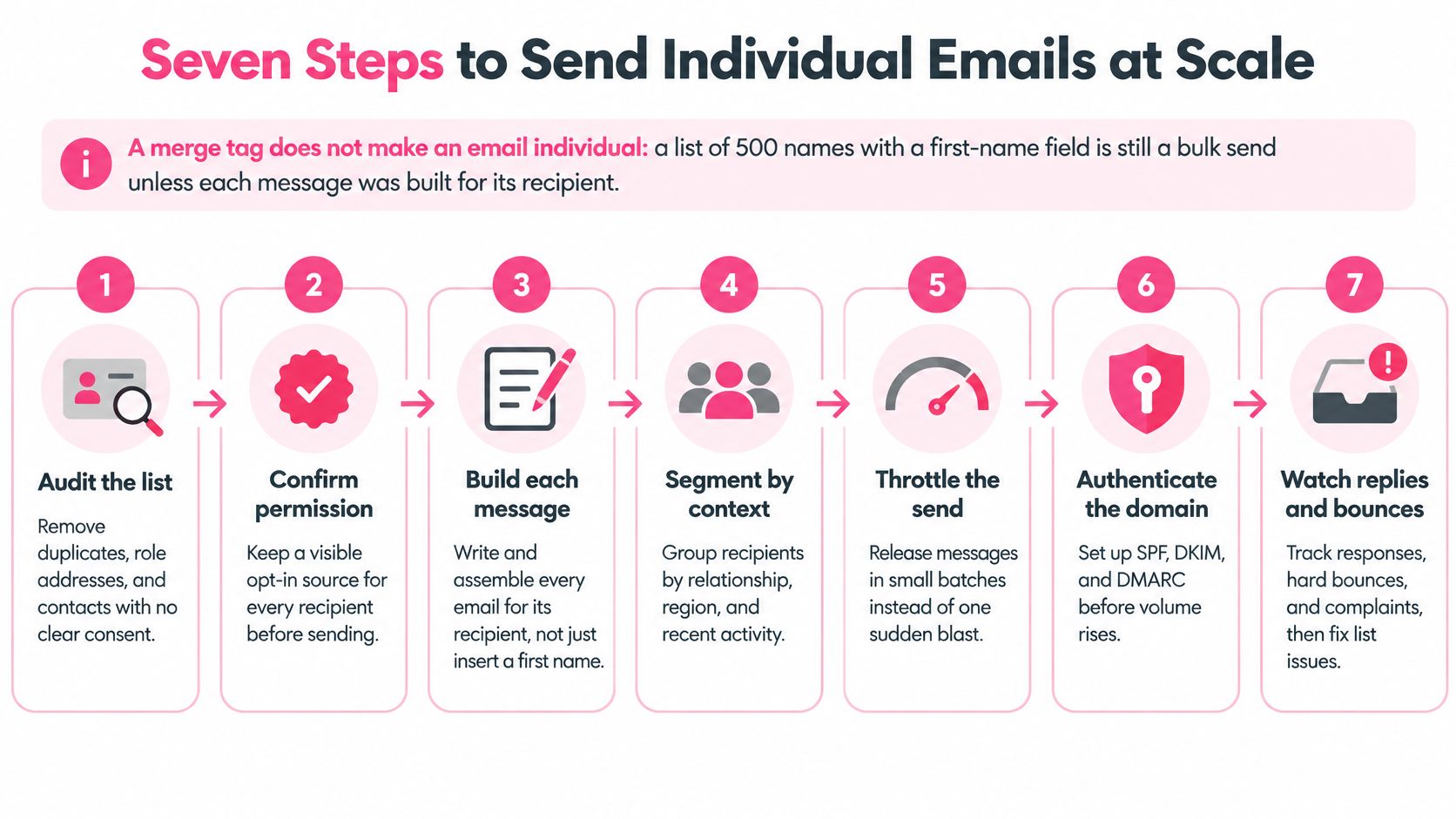
Seven Steps to Send Individual Emails at Scale
A merge tag doesn't make an email individual. Putting a first name above interchangeable sales copy changes the greeting, not the relevance. Build the campaign around a recipient's business situation, then use automation to handle assembly and delivery.
The workflow below keeps list quality, messaging, and sending controls connected.
Build the Campaign Before Scheduling It
Define a narrow ICP segment and a single offer. Your ideal customer profile should describe buyers with a shared problem, buying context, and reason to act. Mixing agency founders seeking appointments with SaaS teams seeking onboarding support makes both the copy and the results difficult to interpret.
Verify addresses and apply suppression. Remove duplicates, role accounts, prior hard bounces, and anyone who has unsubscribed before importing contacts into an active sequence. The common slip is checking the initial list but letting a follow-up tool contact someone who opted out elsewhere.
Build meaningful individualized fields. Capture first name, company, role, a real trigger, and a credible pain hypothesis; Pipecorn's guide to contact enrichment tools can help you choose how to fill those gaps. Verify the trigger yourself, because congratulating someone on an old product launch sounds like you found their website in an archaeological dig.
Use authenticated mailboxes. Configure SPF, DKIM, and DMARC before sending, then inspect a test message to confirm authentication passes. Buying a fresh domain and immediately sending a campaign isn't a shortcut around reputation building.
Write restrained copy with a single primary ask. Plain text or simple HTML keeps attention on the business reason for contacting the recipient. Use the email sequence generator to outline the progression, then remove competing requests to book a call, watch a video, download a guide, and answer a survey.
Stop automation when a person responds. Follow-ups should run only while there's no reply or opt-out, with replies routed to someone who can handle them. Nothing says automated indifference quite like asking whether someone saw your email after they answered it.
Measure commercial outcomes by segment. Track delivery, bounces, positive replies, meetings, and revenue so you can distinguish bad targeting from weak messaging. Don't crown a campaign successful because its open-rate chart looks cheerful.
Keep Identity and Opt-Outs Operational
The FTC's CAN-SPAM compliance guide requires truthful headers, non-deceptive subject lines, clear advertising identification, and a functioning unsubscribe method; that method must work for at least 30 days after sending, requests must be honored within 10 business days, and each violating email may carry a civil penalty of up to $53,088. Operationally, suppress an opt-out immediately rather than treating the legal deadline as a scheduling suggestion.
At Ever Outbound, we're pay-per-close, and our process has 4 steps: build your list of verified decision makers, write and send short copy on warmed domains, book interested prospects onto your calendar, and have you show up to close. Email campaigns launch about 14 days after onboarding because new domains and mailboxes need warmup, while LinkedIn campaigns launch within 72 hours.
Go or no-go: Authentication passes, suppression covers every mailbox, scheduled volume fits the account cap, replies stop follow-ups, and unsubscribe works in one click. If anything fails, hold the send.
Sending Limits by Account Type
| Account type | Daily outgoing limit | Mail merge recipients per day | What it means for a campaign |
|---|---|---|---|
| Standard Gmail account | 500 messages | Native mail merge requires an eligible account | Every personalized copy uses the same daily allowance |
| Work, school or Workspace Individual account | 2,000 messages | 1,500 recipients | After 1,500 combined sends, 500 remain for ordinary email |
| Google Workspace total recipients | 10,000 recipients | 1,500 for mail merge | Recipients are counted per send across all messages |
| Google Workspace unique recipients | 3,000 unique recipients | Subject to the mail-merge recipient cap | A contact emailed five times counts once as unique |
| Google Workspace unique external recipients | 2,000 unique external recipients | Subject to the mail-merge recipient cap | Applies to external addresses only |
The account and mail-merge allowances above come from Google's mail-merge guidance, which lists 500 outgoing messages for standard Gmail, generally 2,000 for work, school, and Workspace Individual accounts, and a 1,500-recipient daily mail-merge cap. The recipient-accounting rows reflect Google Workspace's sending limits, including 10,000 total recipients, 3,000 unique recipients, and 2,000 unique external recipients daily.
Understand the Split Allowance
Personalized copies are separate messages. Mail merge doesn't turn a campaign into a single outgoing email just because you composed it in a single draft.
Google's split allowance also means regular email consumes capacity that could otherwise support mail merge. Once your combined ordinary and mail-merge sending reaches the merge threshold, additional merge messages stop until the quota resets, while the ordinary-email reserve remains available.
Recipient counting is a separate calculation. Repeated sends to the same address consume total-recipient capacity even though that address counts only once toward unique recipients. Adding colleagues in Cc therefore isn't free capacity, and it can make campaign accounting surprisingly untidy.
Work Through the Campaign Before Launch
Say you have a hypothetical 1,400-contact list on an eligible Workspace account. It fits within the mail-merge ceiling, but leaves only about 100 sends of merge-eligible headroom, not merely that amount of total ordinary-email capacity. Splitting the list across two days of about 700 contacts each creates more room for reminders and unexpected activity.
That split is a planning example, not a recommended starting volume for a new mailbox. Your account's maximum is a technical ceiling, not evidence that your audience wants that much email.
For setup, keep one row per recipient in your spreadsheet, with separate columns for each merge field. Draft the message with placeholders, preview records with missing fields, and send a test before releasing individualized copies.
Native mail merge limits Cc and Bcc to a single recipient in each field, and those addresses receive copies across the individualized sends. Don't add your sales manager unless they want a campaign-sized inbox souvenir.
Budget for the whole sequence, not just launch day. Existing follow-ups and ordinary correspondence need capacity too.
Use the outbound volume planner to map scheduled activity before choosing send dates. Calculate messages per contact at each sequence step, include overlapping campaigns, and keep the total below the applicable cap.
When Personal Emails Turn Into Bulk Mail
A campaign of individually written emails can still be bulk traffic. Mailbox providers don't inspect your effort level and award a personal-correspondence exemption because the opening sentence took ages.
The distinction is about aggregate sending and message purpose, not whether recipients see separate copies.
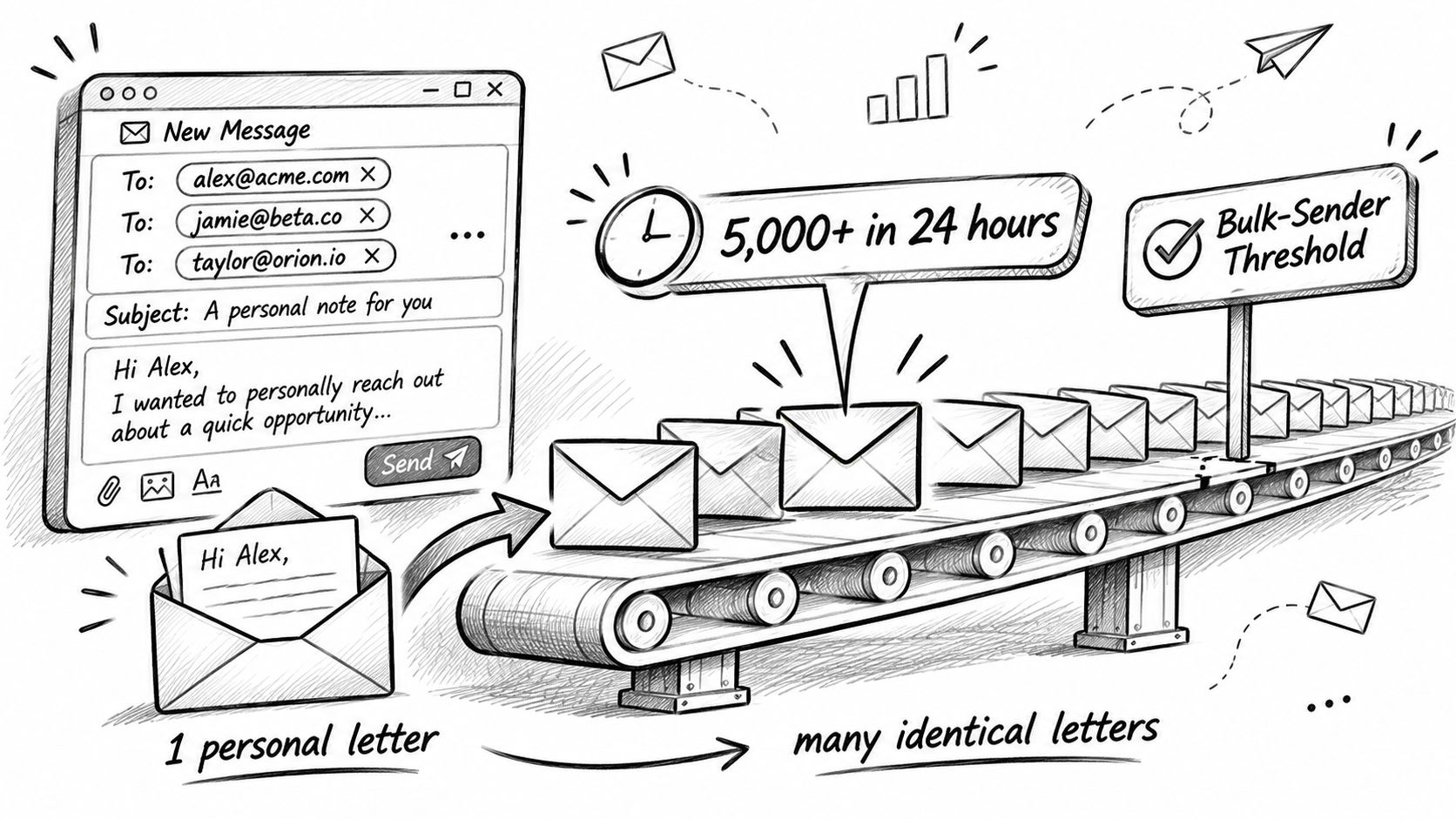
Google's bulk-sender FAQ defines a bulk sender as an entity sending approximately 5,000 or more messages within 24 hours to personal Gmail accounts and requires appropriate authentication, From-domain alignment with SPF or DKIM, and RFC 8058 one-click unsubscribe for applicable promotional traffic. AWS's overview of Gmail and Yahoo requirements describes the 5,000-message daily level for high-volume consumer sending and the expectation to keep spam complaints below 0.3%.
Classify the Sending, Not the Greeting
Ask these questions before deciding that your campaign is ordinary correspondence:
- What started the exchange? A reply to a customer's actual question is different from an unsolicited promotional sequence, even if both use conversational language.
- What's the aggregate provider volume? Count across the sending operation rather than treating each mailbox as a conveniently separate universe.
- Who watches recipient feedback? Assign an owner to daily complaints and unsubscribes, with authority to pause sending rather than merely report a problem afterward.
Consider a hypothetical consultant sending 60 personalized cold emails daily, compared with an operation sending 6,000 unique-sounding messages daily to personal Gmail accounts. The consultant is below the cited bulk-volume threshold, but the messages remain promotional outreach subject to other rules. The larger operation triggers bulk requirements regardless of how many greetings its copywriter invented.
A short explainer can help distinguish the mechanics of separate sends from the obligations attached to scaled outreach.
Variation Isn't Permission
A spintax generator can help create wording alternatives. It can't turn a mismatched offer into a useful message, establish permission, or fix poor complaint handling.
Before expanding, inspect authentication results, domain alignment, unsubscribe processing, suppression coverage, and complaint monitoring as a connected system. A visible unsubscribe link and the technical one-click mechanism serve related but distinct functions; don't assume adding a footer completes both.
Extra mailboxes and subdomains distribute volume. They don't replace relevance or consent. If recipients keep reporting your outreach, expanding infrastructure lets you repeat the same mistake from more places.
Legal Rules for Personalized Cold Email
Adding someone's name, company, or job title doesn't give you permission to contact them. Personalization describes the message. Permission describes whether you may send it. Confusing the two is how a tidy spreadsheet becomes a legal problem.
A publicly visible business address also isn't a universal invitation. Before loading contacts into a campaign, establish which rules apply to the recipient, the message, and your business.
US Identity Rules and EU Permission Rules
For US recipients, commercial email needs honest sender information, a subject line that matches the message, clear advertising identification, and a working unsubscribe route. Don't disguise a cold pitch as an existing conversation with a misleading reply-style subject.
Outsourcing execution doesn't automatically remove the sender's responsibilities. Keep access to contact sources, approved copy, opt-out records, and the suppression process rather than assuming your sending contractor has made everything lawful.
For EU recipients, the EU's online privacy guidance states that prior consent is required for direct-marketing emails promoting brands or products, with a possible exception for an existing customer receiving offers for the sender's own similar products or services. Consent must be freely given, specific, informed, and unambiguous, and people can object to direct marketing at any time, free of charge.
A relevant pitch can still be an unlawful pitch. Better copy doesn't repair missing permission.
Segment EU contacts separately from US prospects and check the applicable national rules before launch. For a broader starting point, Freeform Company's overview of regional data protection requirements helps frame the jurisdictional questions to investigate, without replacing legal advice for your particular campaign.
Keep a Record You Can Actually Use
Your campaign record should answer practical questions, not merely contain a checkbox labeled compliant.
- Contact source and purpose: Record where the address came from and why this person is being contacted.
- Sender identity: Make the business behind the offer clear, including accurate contact details.
- Objection route: Provide an accessible way to refuse further marketing without requiring an account or an explanation.
- Global suppression: Apply objections across every mailbox, imported list, and scheduled follow-up.
Use the cold email grader to identify copy problems before approval. Treat that as an editorial check, not a legal sign-off: a readable message still needs a lawful sending basis and a functioning objection process.
Fixing Deliverability Problems Before They Spread
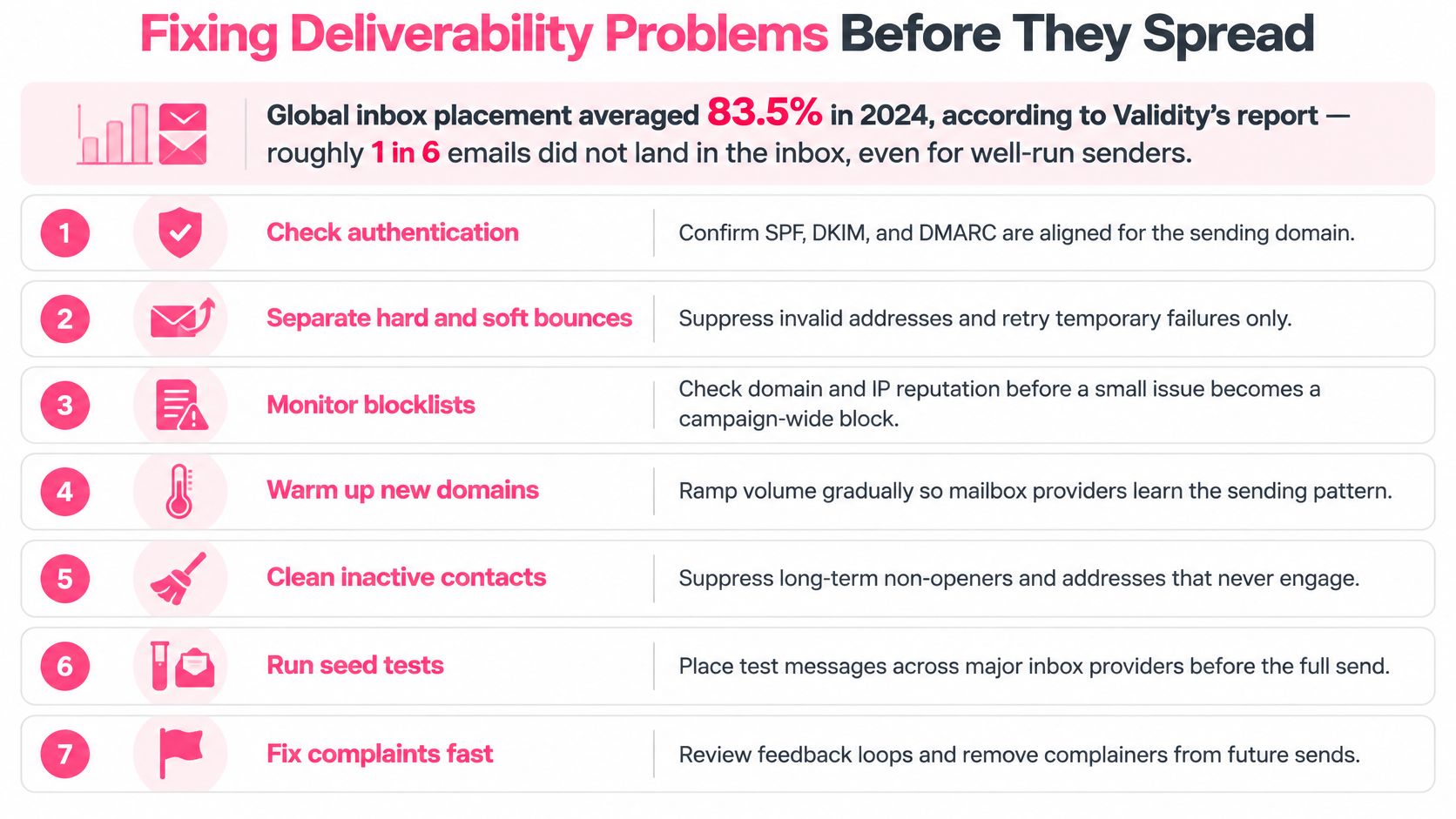
Global inbox placement averaged 83.5% in 2024, according to Validity's email deliverability benchmark report as summarized by MarketSplash. That's roughly one email in six missing the inbox across the benchmark. Treat it as an industry baseline: it doesn't predict your campaign's placement or prove that every sender in the sample was well run.
A dashboard showing “sent” tells you almost nothing. A receiving server accepting your email doesn't mean a prospect ever found it in their inbox.
Work through this checklist to organize the investigation instead of changing everything at once.
Match the Fix to the Symptom
- Bounces suddenly increase: Pause the affected list, re-verify addresses, and suppress permanent failures. Separate hard bounces from temporary failures so you don't keep retrying an address that doesn't exist.
- Replies fade as the sequence continues: Check complaints, provider responses, and audience relevance before adding mailboxes. Reduce daily volume while you investigate; more infrastructure won't explain why people stopped responding.
- Messages land in Gmail spam: Inspect a delivered test message for authentication and alignment failures, then test unsubscribe processing end to end. Run the email deliverability checker as an initial diagnostic, not a guarantee of future placement.
- Unsubscribes rise after a copy change: Compare the new promise with the recipient's actual trigger and business situation. Rewrite the mismatch instead of pushing the same message harder.
Keep a change log covering the segment, mailbox, copy version, and sending adjustments. Change targeting and volume at the same time and an improvement teaches you almost nothing about which fix worked.
Measure What a Human Actually Did
Privacy features and automated scanners can distort open tracking, so opens aren't reliable evidence of buyer interest. A positive reply, a booked meeting, and a closed deal are far better signals for deciding whether a segment deserves continued investment.
Read the negative replies too. A polite “wrong person” points to a targeting problem. Repeated objections to the offer signal something different from widespread delivery failures, and each reply type calls for a different fix.
Seed tests across major inbox providers can expose obvious placement problems, but they can't reproduce every recipient's filtering history. Check relevant blocklists when a sudden rejection pattern appears, and treat a clean result as one data point rather than proof of healthy reputation.
Increase volume gradually only while bounce and complaint patterns stay stable. Run the go-or-no-go checks before each increase, and pause the moment recipient feedback worsens. The goal isn't discovering how much email your infrastructure can push out. It's maintaining a sending operation that produces worthwhile conversations.
At Ever Outbound Inc., we're pay-per-close: we build verified prospect lists, write personalized outreach, manage sending infrastructure, and book interested prospects onto your calendar. If you want a managed approach to individually sent outbound, your team can spend its time on qualified sales conversations and closing deals instead of administering mailboxes.