November 23, 2026
How to Set Up DMARC Without Losing Legitimate Email
You're in the DNS console with a DMARC record ready to paste. Google Workspace looks healthy, marketing says its platform is authenticated, and someone has described the job as a quick security fix. Meanwhile, the invoicing system nobody mentioned is still sending through a vendor's default domain.
That's how a tidy DNS change becomes a finance problem. Learning how to set up DMARC means identifying legitimate mail, proving alignment, and reading reports before asking receiving servers to reject failures. Publishing the record is the easy part. Knowing when it's safe to enforce it is the work.
Table of Contents
- How to Inventory Senders and Pass Alignment
- Publish a Starter DMARC Record and Confirm Reports
- Reading Reports and Fixing What Fails
- Protecting Subdomains and Separate Sending Streams
- Moving from p=none to Enforcement Safely
How to Inventory Senders and Pass Alignment
Authentication and alignment are different checks. A provider can authenticate a message perfectly while proving ownership of its own domain, not yours. DMARC needs a passing SPF or DKIM result whose authenticated domain aligns with the address recipients see.
Google's email sender guidelines, which began applying to Gmail delivery on February 1, 2024, establish authentication requirements, including DMARC publication for bulk senders, and explain that either SPF or DKIM alignment can satisfy DMARC. A passing result for an unrelated domain doesn't qualify.
Build the sender list before changing policy
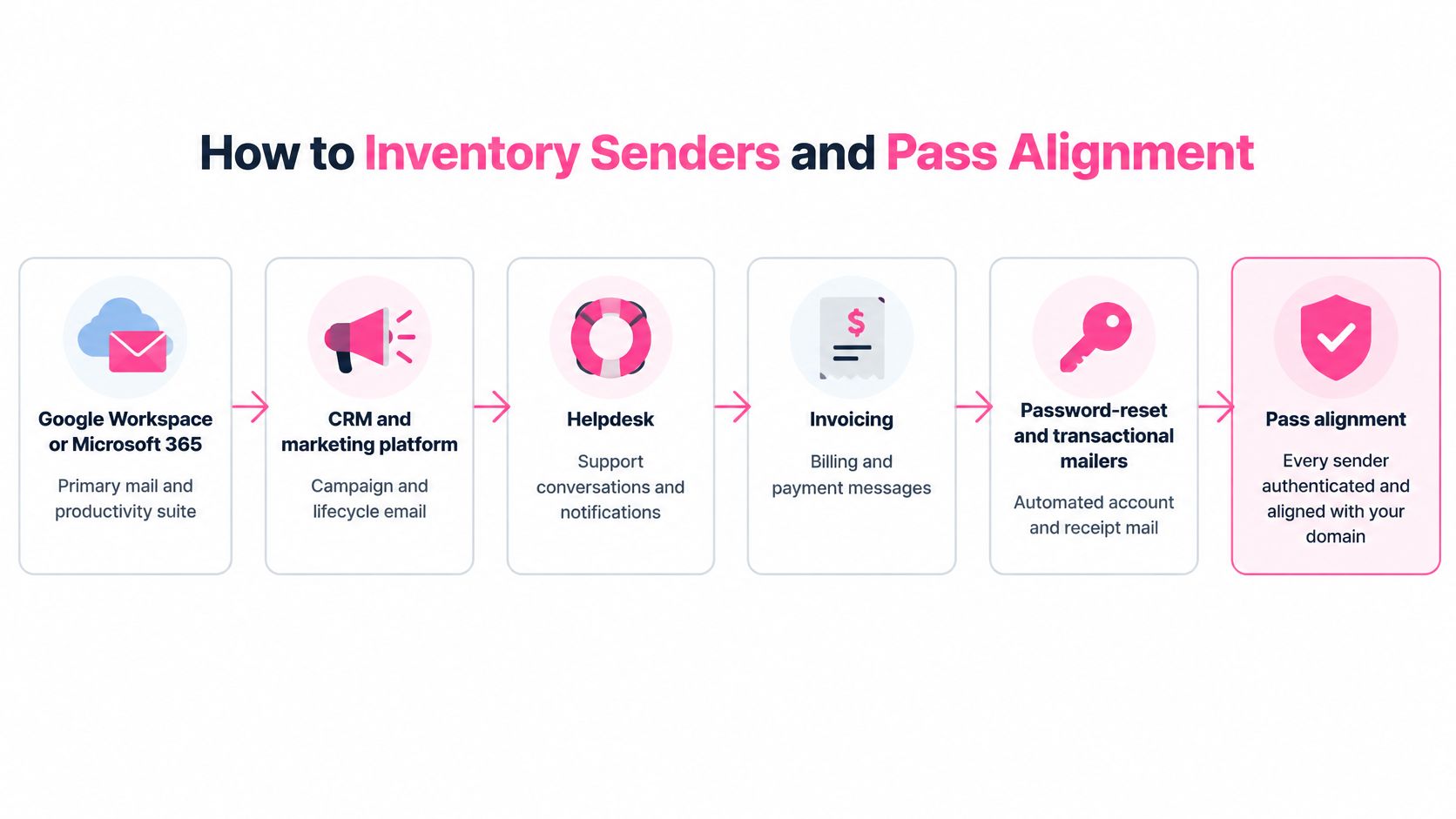
Find every service sending as your domain. Include Google Workspace or Microsoft 365, CRM and marketing platforms, the helpdesk, invoicing, password-reset and transactional mailers, and outbound sales tools. Ask finance, support, operations, and sales separately, because the person managing DNS rarely owns every sending account.
Treat forgotten SaaS tools as shadow IT. MR2 Solutions' guidance on spotting rogue devices on your network offers a useful parallel: you can't govern infrastructure that nobody has inventoried.
Configure SPF where the service requires it. Add the provider's approved include mechanism to the existing SPF record for the relevant envelope domain rather than publishing competing SPF records. Keep within the 10 DNS lookup limit, including nested provider lookups, because an apparently short record can still exceed the allowance.
Enable DKIM inside each sending service. Publish its selector record, then activate signing in the provider's console. Check the actual message's
d=signing domain, because publishing a DNS record doesn't prove the service is using it.
The inventory should include automated senders, not just the mailboxes people open every morning.
Test what recipients actually receive
Compare authenticated domains with the visible From domain. Inspect SPF's envelope sender and DKIM's signing domain, not merely the green badges in a vendor dashboard. Configure custom DKIM signing or a supported custom return-path when the provider otherwise authenticates only its own domain.
Send a representative message to Gmail. Open Show original and inspect
Authentication-Results, includingspf=pass,dkim=pass, and the DMARC result. Use the email deliverability checker for a DNS sanity check, but keep the delivered message as evidence of what the sender did.Flag forwarding and redistribution paths. Test helpdesk forwarding, aliases, partner forwarding, and mailing lists separately from direct delivery. SPF often fails after forwarding, while an intact aligned DKIM signature may preserve the DMARC pass.
Practical rule: A vendor's “authenticated” label is a starting point, not acceptance evidence.
Finish with a spreadsheet containing source, service owner, visible From domain, envelope domain, DKIM signing domain, alignment status, and test evidence. Give every sender a row and every unresolved failure an owner. The spreadsheet is less glamorous than a security dashboard, but considerably more useful when an invoice disappears.
Publish a Starter DMARC Record and Confirm Reports
Say a team publishes an enforcing record on Friday and discovers on Monday that invoices aren't arriving. Nobody changed the billing application. They asked receivers to reject a sending stream they hadn't tested.
Start with a monitoring record instead:
v=DMARC1; p=none; rua=mailto:dmarc-reports@yourdomain.com
Publish it as a TXT record at your domain's _dmarc host. Replace the example reporting address with a mailbox you control. p=none requests monitoring without DMARC-based blocking, although recipients can still filter messages for other reasons.
The IETF DMARC revision draft describes rua aggregate reporting and the monitoring-first approach. Reports let you discover misaligned legitimate senders, unauthorized sources, and delivery paths that need investigation.
DMARC tags and what each one controls
Only v and p are required, but a monitoring deployment without a working reporting destination gives you little operational visibility.
| Tag | Example | Required? | What it controls |
|---|---|---|---|
| v | v=DMARC1 |
Required, must come first | Protocol version |
| p | p=none, p=quarantine or p=reject |
Required | Policy for mail that fails alignment |
| rua | rua=mailto:dmarc-reports@yourdomain.com |
Recommended | Mailbox that receives daily aggregate reports |
| ruf | ruf=mailto:forensics@yourdomain.com |
Optional | Requests failure samples; many large receivers don't send them |
| pct | pct=25 |
Optional, default 100 | Share of mail the policy applies to |
| adkim | adkim=s or adkim=r |
Optional, default r | DKIM alignment strictness; s requires an exact domain match |
| aspf | aspf=s or aspf=r |
Optional, default r | SPF alignment strictness |
| sp | sp=reject |
Optional, defaults to p | Policy for subdomains |
Leave optional tags out until you have a reason to use them. Extra punctuation isn't extra security, and failure reports aren't a substitute for aggregate reporting.
Publication and protection aren't interchangeable. As of December 2025, Red Sift's global DMARC adoption guide reported that 14.9% of 73.3 million analyzed domains had begun with at least p=none, while 2.5% used p=reject. A valid monitoring record alone doesn't instruct receivers to stop impersonation.
Publish, validate, and receive
Prepare the reporting destination. Create a dedicated mailbox or use a report-processing service. Aggregate reports arrive as compressed XML, so choose something that can turn them into searchable sender and alignment records rather than leaving attachments unread.
Publish the starter record. Check whether your DNS console expects the short host name or the complete hostname. Some interfaces append the domain automatically, which makes pasting the full name an surprisingly effective way to publish at the wrong place.
Inspect the public TXT result. Confirm there's exactly one DMARC policy record at the intended host. Check tag order, semicolon separators, the
mailto:prefix, and how the DNS interface handles quotation marks. A 2025 Mail Studio analysis identified live-record errors including misplaced policy tags and missingmailto:prefixes.Allow DNS caches to update. Budget a few hours operationally, but use the published TTL and fresh lookups to judge visibility. Don't keep editing the record because a cached result hasn't changed.
Confirm reports arrive. Test that the mailbox accepts outside mail and check filtering or attachment restrictions. Expect initial reports within a day or two as a working expectation, not a receiver guarantee.
A published
ruaaddress isn't a reporting system until someone can receive, parse, and review what arrives.
If the reporting destination belongs to another domain, check whether external reporting authorization is required. Otherwise, a syntactically correct record can still leave you staring at an empty inbox.
Reading Reports and Fixing What Fails
A legitimate vendor passes SPF on its own envelope domain, sends with your address in the visible From field, and fails DMARC. The vendor says SPF is working. It is. It's just answering the wrong ownership question.
The DMARC specification evaluates authentication results alongside identifier alignment. Read both the authentication detail and the policy-evaluated result, because a raw SPF pass doesn't establish a DMARC pass.
Triage by source and business importance
Sort aggregate reports by sending source and message volume, then map each source to the inventory owner. Review high-volume streams first, but immediately investigate failures involving invoices, account recovery, or customer support.
Check the sending IP, provider identity, envelope domain, and DKIM signing domain together. A shared cloud IP doesn't tell you which customer or application sent the message. Ask the named service owner to trigger a test and compare its headers with the report.
Classify each source as known and aligned, known and broken, confirmed unauthorized, or unresolved. Don't authorize an unfamiliar sender merely to improve the dashboard's pass rate.
Common DMARC failures, causes and fixes
These are planning estimates, not DNS or vendor service guarantees. Cache behavior, account permissions, and support queues determine the actual elapsed time.
| Symptom | Likely cause | Fix | Time to fix |
|---|---|---|---|
| SPF passes but DMARC fails | SPF passed on the provider's envelope domain, not your From domain | Set a custom return-path on your domain, or rely on DKIM alignment | A day for a DNS change |
| DKIM passes but DMARC fails | The d= signing domain doesn't align with the From domain |
Sign with your domain or an approved aligned subdomain | A day, or weeks if the vendor must change its setup |
| Legitimate mail fails after forwarding | The forwarder changes the SMTP path, so SPF breaks | Rely on DKIM when its signature survives forwarding | A day to a week, including a forwarding test |
| A known vendor is missing from reports | The tool doesn't send as your domain, or the expected stream hasn't appeared | Verify a test message, update the inventory, then configure SPF and DKIM where needed | Weeks if waiting on vendor support |
| Reports never arrive | The rua address lacks mailto: or doesn't exist |
Correct the syntax and create the mailbox | A day, plus DNS cache time |
| Two DMARC records on one host | A duplicate TXT policy record was published | Keep exactly one policy record per exact domain | A day for a DNS change |
| SPF fails with too many lookups | The SPF record exceeds 10 DNS lookups | Remove unused includes or consolidate sender authorization | A day, or weeks if a vendor include must change |
A missing vendor isn't automatically a broken vendor. Aggregate reports describe traffic participating receivers observed, not a complete export of your application accounts.
Keep content review separate from authentication remediation. The cold email copy grader can help assess messaging, but rewriting a subject line won't repair a misaligned signature.
Record each change, its owner, and the test result. Re-check the next report cycle before changing anything else, so you can tell whether the repair worked rather than celebrating a quieter dashboard.
Protecting Subdomains and Separate Sending Streams
A DMARC record at the organizational domain generally governs subdomains that don't publish their own policy record. sp sets the inherited subdomain policy; without it, subdomains inherit the parent's p policy.
For example, p=quarantine alongside sp=reject requests quarantine for failures at the parent and rejection for failures on inheriting subdomains. A subdomain's own DMARC record takes precedence for mail using that subdomain in the visible From address.
Set the policy boundary deliberately
Relaxed alignment allows domains sharing the same organizational domain to align. A DKIM signature from mail.example.com can therefore align with a visible From domain of example.com.
Strict alignment requires an exact match. Setting adkim=s or aspf=s can make an otherwise working subdomain arrangement fail, so don't tighten those tags merely because strict sounds more secure.
Use separation to make ownership and policy changes manageable:
Put marketing and cold outreach on a dedicated subdomain, such as
outreach.example.com. Configure its supported custom SPF return-path and DKIM selector so that the stream has an identifiable owner and authentication setup.Keep transactional mail on another subdomain or the main domain. Invoices and password resets shouldn't share a policy rollout decision with an experimental prospecting platform.
Publish a separate DMARC record when the stream needs a different policy. Don't add independent records everywhere by habit, because every exception becomes another configuration to maintain.
Inspect each stream's actual DKIM
d=value against its From domain and chosen alignment mode. An approved subdomain still won't satisfy strict alignment unless the domains match exactly.
Separate operations, not just names
Use the outbound volume planner when allocating outbound capacity, then document which sending stream owns each domain. Naming a subdomain doesn't create a guaranteed reputation firewall, and it doesn't excuse poor targeting or excessive sending.
Boundary check: A subdomain without its own policy isn't outside DMARC. It's governed by the applicable parent policy.
Before tightening the parent, check unused and unfamiliar subdomains as well as active ones. An unknown sender there will be judged according to the parent's p and sp settings, not according to whether your marketing team remembers creating it.
Moving from p=none to Enforcement Safely
Don't promote a domain because its overall pass rate looks reassuring. A large employee-mail stream can hide a small, broken password-reset service. The exit gate is coverage of legitimate senders, not a flattering average.
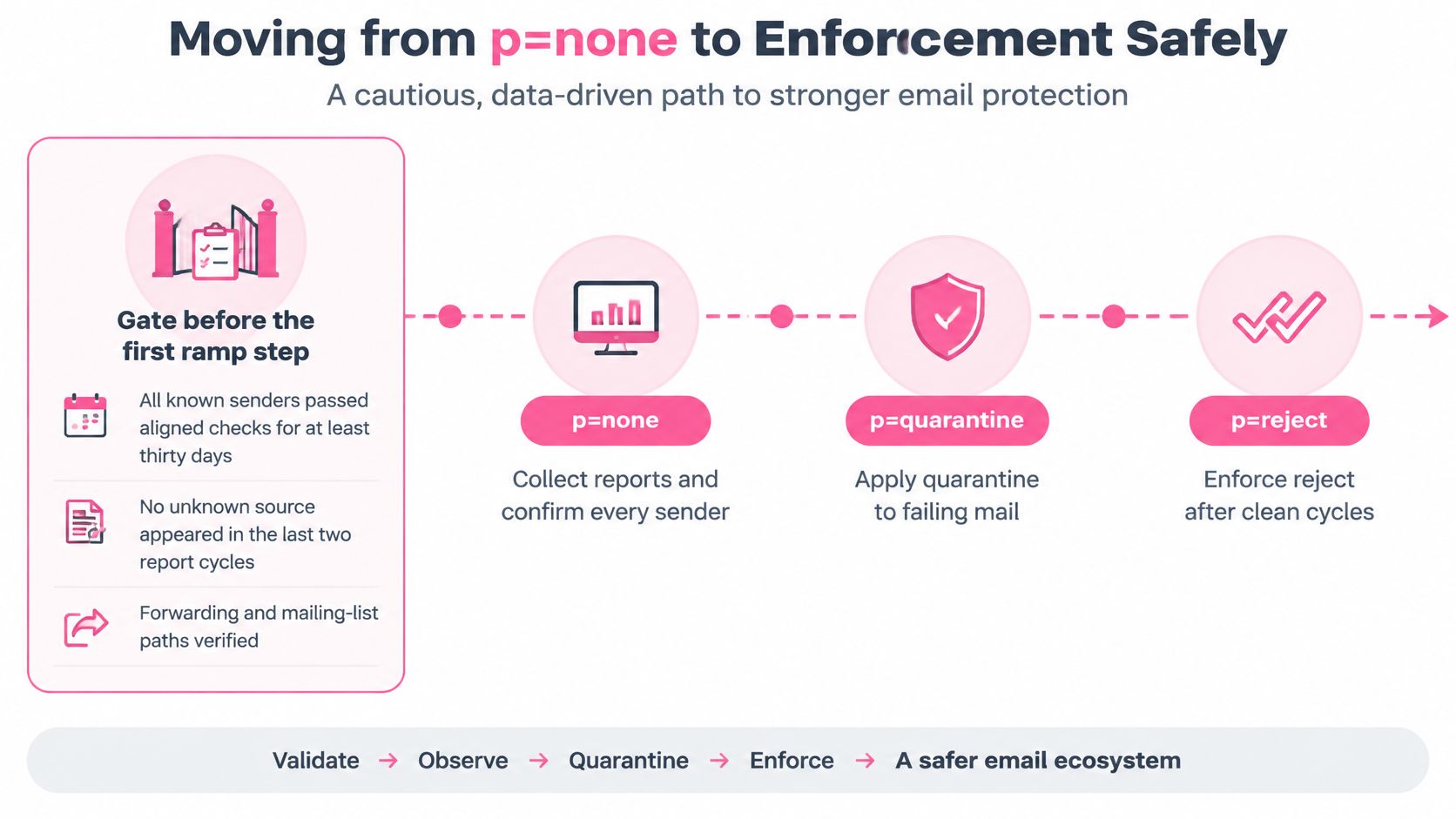
I'd use the following conservative gate before the first enforcement change. These are operating recommendations, not protocol-mandated waiting periods:
- Known senders verified: Every inventoried sender has passed aligned checks across at least thirty days, including its relevant sending cycles.
- Unknown sources resolved: No new unknown source has appeared in the last two report cycles. Continuing confirmed spoofing is not a reason to postpone enforcement indefinitely.
- Indirect delivery tested: Representative forwarding and mailing-list paths preserve a usable aligned DKIM result.
- Reporting operational: The
ruadestination receives reports, and a named person reviews them.
If a condition fails, stay at p=none and fix the gap. If a quarterly billing stream hasn't run during your observation window, trigger a representative test rather than assuming the calendar proved it safe.
The rollout should look like a controlled change, with a gate before each increase.
Ramp quarantine before requesting rejection
The RFC 7489 policy specification defines pct as an integer from 0 through 100, defaulting to 100 when omitted; p=quarantine; pct=25 requests enforcement on approximately a quarter of applicable failing messages. The percentage limits enforcement, not reporting, so aggregate reports should continue throughout the rollout.
Start with
p=quarantine; pct=25. Keep the reporting address unchanged. Save the previous record and name the person authorized to restore it if a legitimate stream starts failing.Watch for a week as an operating checkpoint. Ask finance, support, sales operations, and IT about missing invoices, tickets, supplier messages, and reset emails. Check reports and application delivery logs, because silence from customers isn't proof of delivery.
Raise
pctto 50, then 100. Repeat the watch period at each step. If a legitimate source fails, repair that source and verify fresh evidence before proceeding.Move to
p=rejectonly after full quarantine coverage stays clean for a week. Removepctfor full requested coverage and retainrua. Schedule the change while the people responsible for DNS and critical sending applications are available.
Receiver policy can override your requested disposition. Treat your DMARC record as a published handling request, then inspect what receivers report applying.
For a companion walkthrough, use the video alongside your change checklist.
Keep a rollback path and an ongoing owner
Reject normally refuses failing mail during delivery, rather than placing it somewhere the recipient might discover later. The sending system may receive a rejection, but your customer may never see the message. Check bounce handling and application alerts before relying on complaints.
Keep the reporting mailbox active after enforcement. New CRM integrations, replacement helpdesks, and billing migrations can introduce fresh failures long after the original rollout looked complete.
At Ever Outbound, we're pay-per-close, and we write and send short, specific copy on warmed domains so emails land in the inbox. Authentication supports that process, but it doesn't replace relevant messaging, controlled volume, or ongoing delivery checks.
Before closing the change ticket, put the next report review on a named person's calendar. Choose the date now, and require a fresh alignment check whenever someone adds a sending service. Otherwise, today's carefully managed policy becomes tomorrow's unexplained invoice problem.
At Ever Outbound Inc., we're pay-per-close and provide fully managed B2B client acquisition, including sending infrastructure, prospect research, outreach copy, and appointment setting. If you'd rather have a team manage outbound execution while you focus on qualified sales calls, visit us to discuss your sending setup and acquisition goals.